

Bloomreach Experience Manager V16.6 Release Notes
Highlights for v16.6
We are pleased to announce a new version of Bloomreach Experience Manager (brXM). This minor release introduces a number of new features, useful technical stack upgrades and improvements to the product. In this document we will give a brief overview of the highlights in this release. You can also find these release notes at: https://xmdocumentation.bloomreach.com/about/release-notes/release-notes-overview.html
Everything mentioned in this document is an integral part of Bloomreach Experience Manager (brXM), unless mentioned otherwise.
Significant Updates
Expanded Context and History for AI Content Assistant
Building on the foundation of the AI Content Assistant, this release significantly expands its capabilities, providing more powerful tools for content workflows:
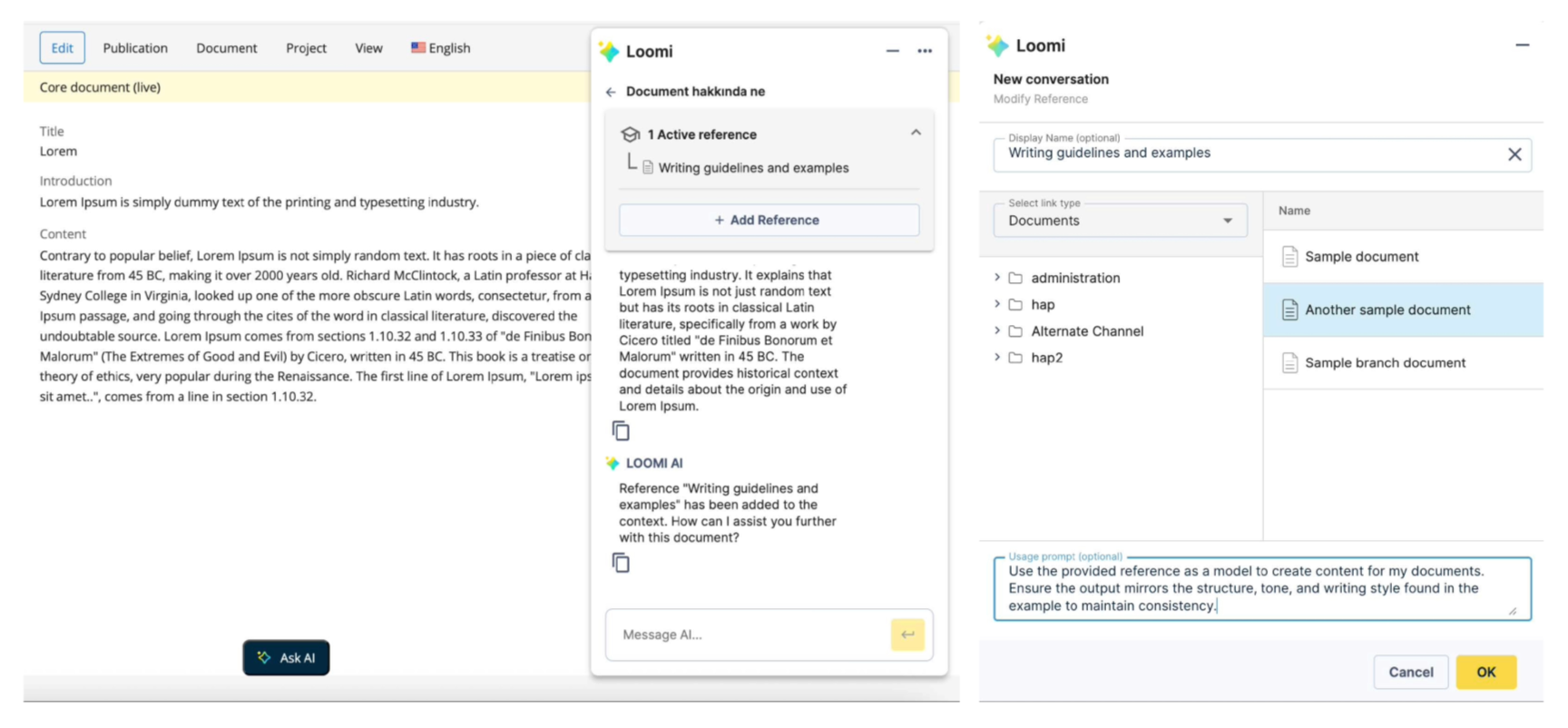
Expanded Contextual Awareness (References):
The AI chat assistant’s context now moves beyond the single open document. You can now guide the assistant by referencing multiple specified documents from the CMS repository. This empowers the AI to leverage broader internal knowledge for advanced tasks, such as creating new content with specific guidelines or personalization variants based on multiple sources. Access to internal documents always respects the current user’s permissions.
Persistent Chat History:
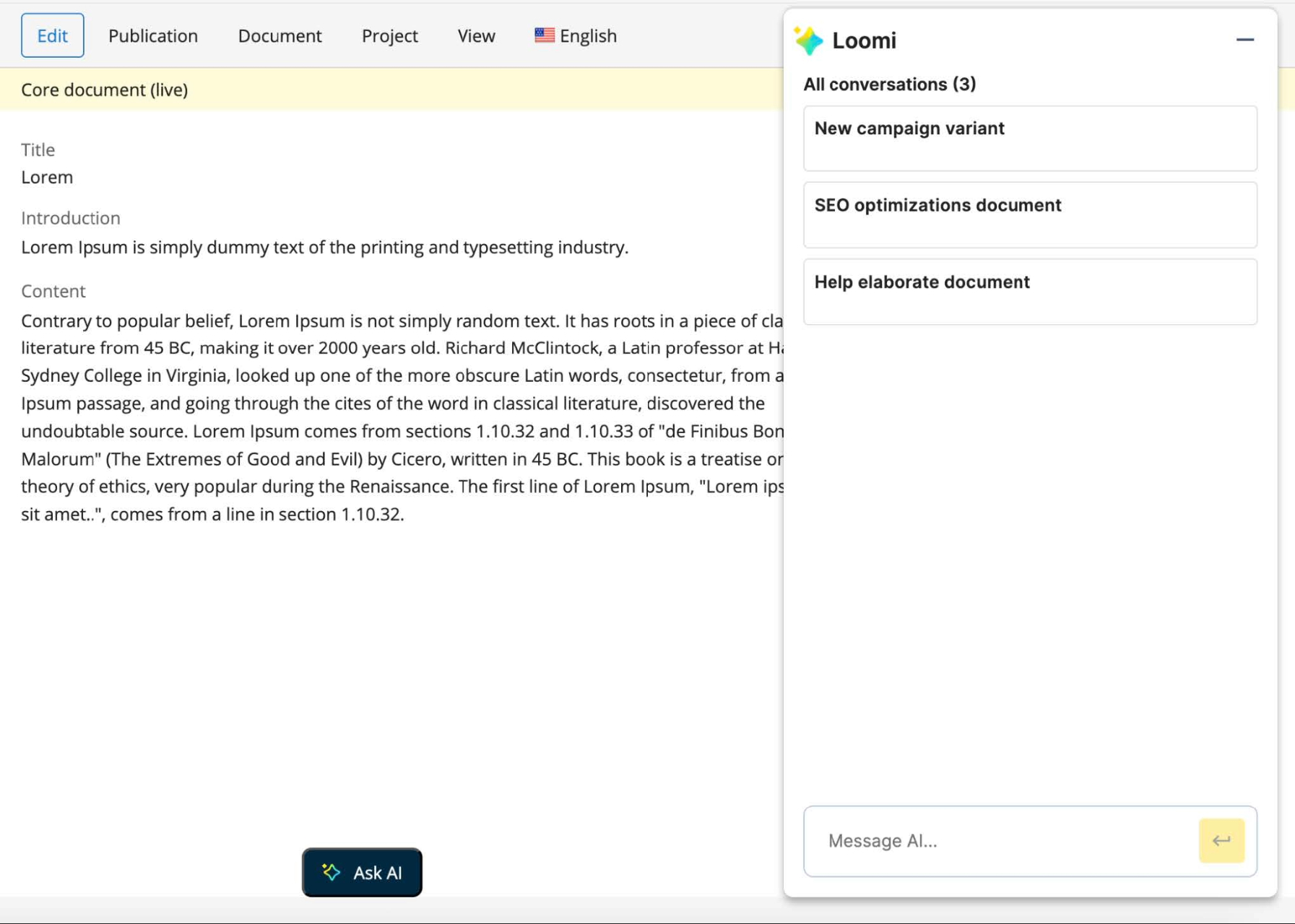
The assistant now retains your conversation history for the duration of your session that is served on the same server. This allows you to maintain context across multiple tasks and continue previous discussions without losing the thread when switching topics. New conversations are now automatically titled using AI to provide descriptive names, improving clarity and organization. Additionally, you can now configure a maximum message limit per conversation in the AI Content Assistant settings. This feature helps manage usage and ensures the conversation's context window remains focused.
These enhancements are a fundamental step towards our vision for AI-first content management, further boosting CMS Users’ efficiency and accuracy.
Find more information in the AI Content Assistant user guide [1].
Audit Logging:
All interactions with the AI are now logged, supporting essential auditing and compliance requirements.
LiteLLM Support:
The AI Content Assistant now supports LiteLLM, a versatile LLM model gateway. You can integrate your existing LiteLLM account to utilize a broader range of available models within the assistant.
Please find more information in AI Content Assistant developer guide [2].
Introducing Homepage 2.0: The Future of Your CMS
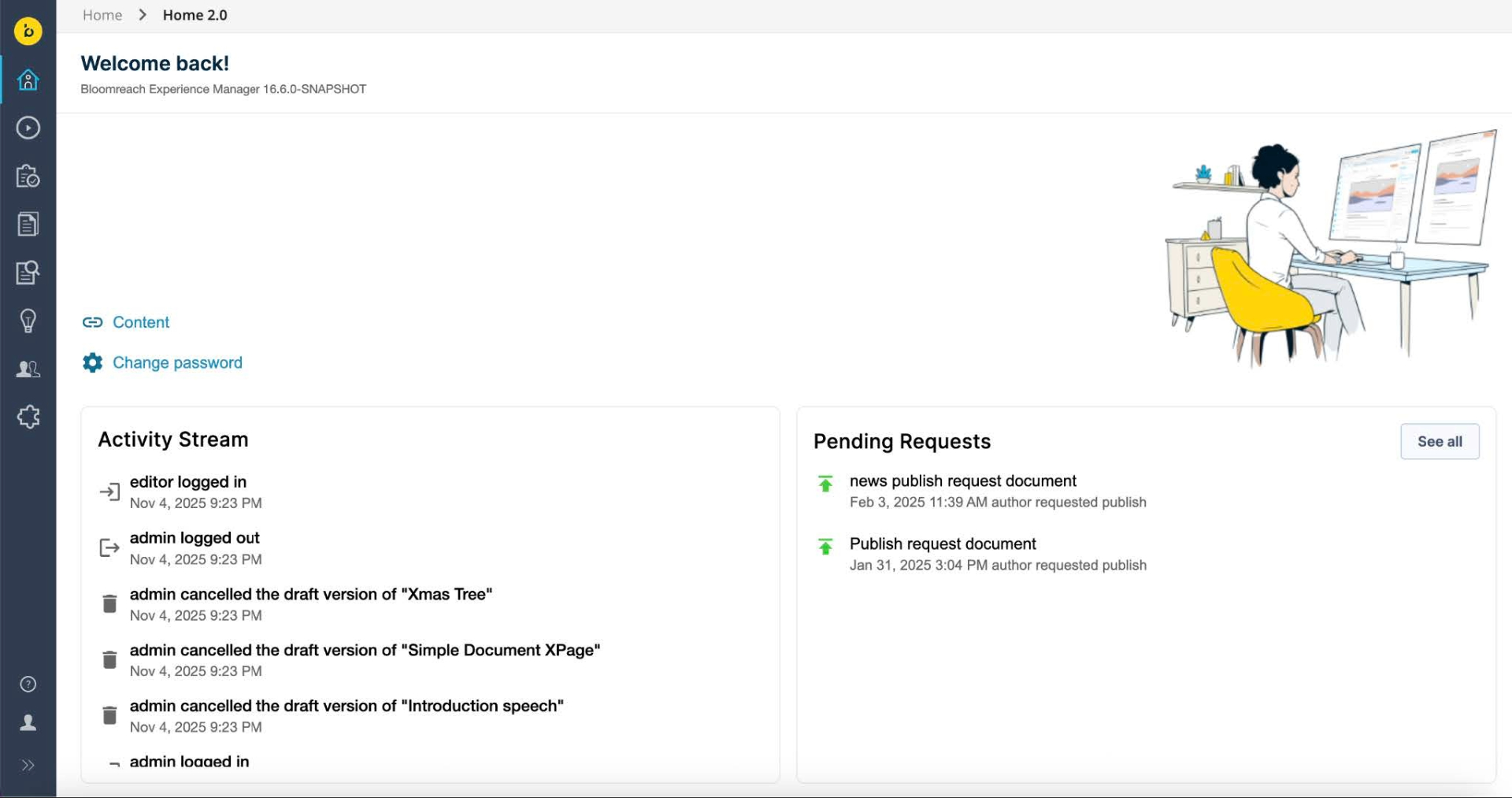
We're excited to announce the launch of Homepage 2.0, a significant step in our mission to modernize the BrXM UI. This release marks a key milestone in replacing our legacy Wicket-based applications. Your feedback and requirements are invaluable as we continue this UI modernization initiative, ensuring we deliver a user-centric experience with the flexibility needed for your unique use cases and customizations.
Modern Architecture, Boosted Performance:
Homepage 2.0 is built using the modern Angular framework, delivering a more secure, maintainable, and high-performing application. This foundational upgrade translates directly to a more responsive, smoother user interface for you. We have technically re-designed the application, replacing Wicket plugins for key components like the Activity List and Pending Requests with new REST APIs.
Adapt at Your Own Pace
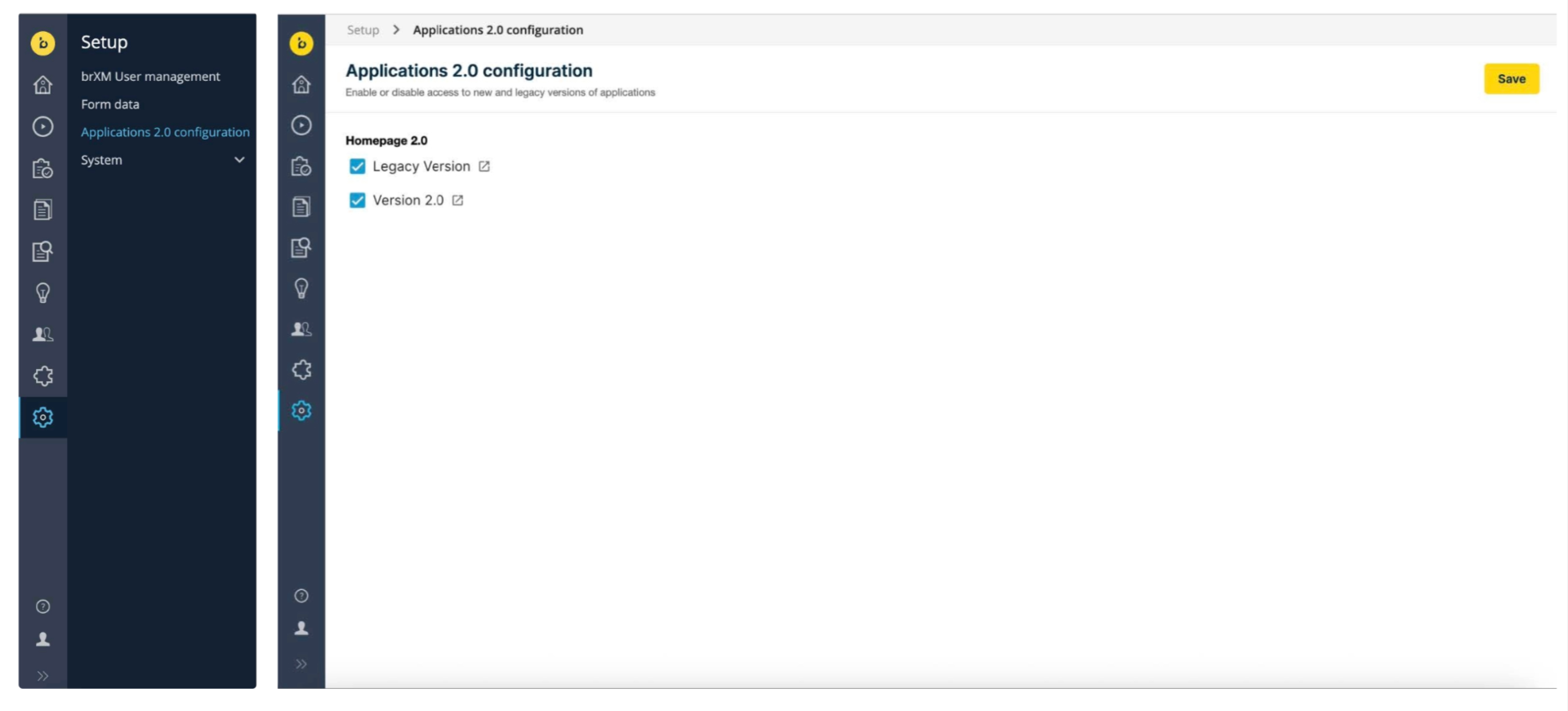
We prioritize a smooth transition. Homepage 2.0 is designed to run concurrently with the existing legacy homepage. Administrators gain full control through the Apps 2.0 Configuration GUI (found under the Setup menu), allowing them to toggle the legacy Wicket UI and the new Angular UI on or off for individual applications like Homepage 2.0. This flexibility is essential for customers who have customized the Wicket UI, allowing them to adapt when they are ready.
Find more information in the Modernizing Wicket Applications documentation[3].
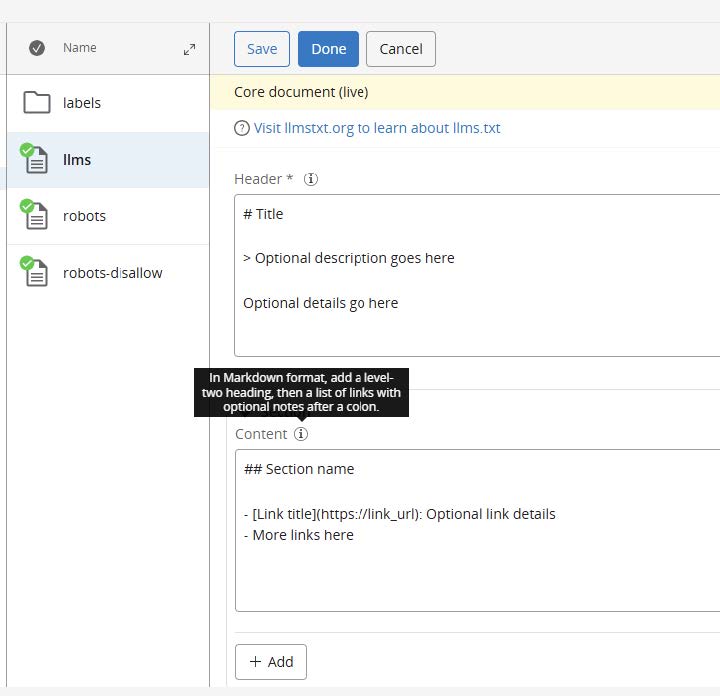
Introducing LLms.txt plugin
Large language models increasingly rely on website information, but face a critical limitation: context windows are too small to handle most websites in their entirety. Converting complex HTML pages with navigation, ads, and JavaScript into LLM-friendly plain text is both difficult and imprecise.
The LLms.txt plugin adds a dedicated document type to CMS, allowing webmasters to manage the contents of llms.txt files, which are used to provide LLMs with human and LLM readable content. See llmstxt.org for more information on the format and purpose of that file. The plugin provides beans and a standard component for retrieving the llms.txt-related data from the content repository, and a sample Freemarker template for rendering that data as a llms.txt file.
Find more information in the Llms.txt Plugin documentation [4].
Ongoing Enhancements and Fixes
For end users
-
We fixed an issue where some validation messages were cut off or overlapping in the Experience View.
-
We addressed an issue where adding an extra field using the '+ Add' button did not work reliably in single- and multi-value compound fields.
-
We corrected an issue where a taxonomy field falsely showed as required in the Experience Manager.
For developers
-
We introduced a makeCollapsible property under the cluster.options node to make the collapse functionality of compound fields configurable, improving readability for editors.
-
We fixed an issue where setting hst:locale on a mount was not properly registered when hstLinkUrlPrefix was used, causing mount.getLocale() to return the parent locale.
-
We removed an unnecessary call to retrieve Xpage versions when editing a component in the Experience Manager, improving performance.
-
We added WARN loggings in cases where taxonomy key(s) are missing in the document.
-
We fixed an issue where custom component JavaScript was not executing in the Experience Manager after upgrading, due to differences in DOM manipulation between jQuery and pure JavaScript.
Professional Services Plugin Newsletter
The Translation Addon[5], version 7.2.0, has been released. This update includes important fixes and improvements:
-
GlobalLink Connector Update: The deprecated GlobalLink connector has been rewritten to use the GlobalLink REST API.
-
Select All / Select None Button: A new "Select All / Select None" button has been added to the translation dialog for both document and advanced search translation requests, simplifying the selection of target languages.
-
Preselect Translation Targets Setting: This fix ensures that the preselect translation targets setting now works correctly when the dialog is opened from Advanced Search, as it does when opened from a document.
Get help from BrXM Experts for Upgrade
The Bloomreach Professional Services team possesses extensive expertise in BrXM and has successfully executed various project implementations. Our team can facilitate a seamless upgrade of your project to the latest BrXM versions.
Additionally, we offer an Upgrade Assessment service for your projects. In just 3 days, our comprehensive evaluation will provide you with invaluable insights into your investment requirements. Our team of experts meticulously assesses your existing systems and infrastructure to determine the necessary investment for the upgrade.
The resulting detailed report encompasses the following components:
-
Executive summary
-
Overview of major changes
-
Recommended upgrade procedure
-
A comprehensive list of findings
It's important to note that the evaluation fee* is fully refundable should you decide to proceed with our Professional Services for the actual upgrade. This ensures that you not only receive top-notch guidance but also keeps your best interests in mind.
If you're interested in availing the assistance of our Professional Services team for your upgrade, please get in touch with your account manager. We're here to support your project's success every step of the way.
Notices
This release introduces the following node type definition (CND) change:
- added property hst:localnetworkaccessenabled (boolean)
Important: simple rollback not supported
The above CND change means that an upgrade to 16.6.0 cannot be rolled back simply by redeploying the previous distribution on the already upgraded repository, by swapping binaries or containers.
If you need to downgrade, you must restore from a full repository backup taken before the upgrade.
Accelerating Innovation: New Policy for Incubating Features
We are committed to delivering cutting-edge features, especially those related to rapidly evolving technologies, faster than ever before. To support this goal, we are introducing a formal process for releasing some of our new functionalities as "Incubating Features".
What You Need to Know
-
Definition: Incubating features are new APIs, extension points, or functionalities introduced for early adoption and feedback.
-
Ready for Use: These features are production-ready and tested by the Bloomreach Content team.
-
The Benefit: This allows us to deliver new capabilities quickly, especially those addressing new or rapidly evolving technology use cases.
-
The Risk: Incubating features may undergo significant changes, including backward-incompatible modifications or removal, outside of standard major releases (meaning changes can occur in minor or patch releases). Upgrade guidelines for these features will be provided.
-
Impact Guarantee: Any backward-incompatible changes will not impact the out of the box experience for end users in the CMS. These changes are strictly isolated to developer integrations and affect only those teams who extend or customize the incubating feature itself, potentially requiring them to update their custom solutions.
-
Identification: All incubating features will be clearly documented and marked in the code, documentation, and release notes.
We strongly encourage you to use these features and provide feedback, helping us shape their evolution. For more information please see Incubating Features documentation[6].
In v16.6,0 specifically:
Groupid:changed from com.bloomreach.brx.ai to com.bloomreach.xm.ai
Artifacts:The term 'incubating' was appended to two artifacts.
<dependency>
<groupId>com.bloomreach.xm.ai</groupId>
<artifactId>content-ai-service-impl-incubating</artifactId>
</dependency
<dependency>
<groupId>com.bloomreach.xm.ai</groupId>
<artifactId>content-ai-service-rest-incubating</artifactId>
</dependency>
The following only need the groupid change:
<dependency>
<groupId>com.bloomreach.xm.ai</groupId>
<artifactId>content-ai-service-client-bootstrap</artifactId>
</dependency>
<dependency>
<groupId>com.bloomreach.xm.ai</groupId>
<artifactId>content-ai-service-client-assistant-angular</artifactId>
</dependency>
JVM default time zone on Bloomreach Cloud
When running brXM v16.x on Bloomreach Cloud, the JVM default time zone is UTC. Any date/time processing that relies on the JVM default time zone (instead of an explicitly configured one) will therefore use UTC.
Changing the time zone behavior
- CMS UI time zone
Configure the login page timezone dropdown. This allows users to select their timezone on login, defaulting to the browser timezone. It's also possible to configure a single timezone for all users.
See: Configure the CMS login page (time zone selection dropdown) - JVM default time zone
Alternatively, the timezone can be explicitly set as a JVM system property. Upload a properties file containing, for example, user.timezone=Europe/Amsterdam and configure it as a Java System Properties file during deployment.
Minor release
v16.6 is a minor release, so it is backward compatible with the previous minor release. Also, updating to this version from the previous minor version should be of little effort. Specific upgrade instructions for this release can be found in our documentation[7] for enterprise customers (requires a login). An overview of all upgrade instructions for minor versions in this major release can also be found in our documentation [8].
Supported Technologies
The full system requirements can be found in the online system requirements [9]. This page also includes a detailed table of maintained third-party compatibility.
End-of-life, support and maintained code
Nomenclature refresher
As the terms ‘end-of-life’, ‘supported’, ‘maintained’ are used in various ways in our industry, we clarify the nomenclature we use for this below.
Supported product version
When a product is supported, this means that the customer will receive help from the helpdesk when issues arise as described in the service level agreement (SLA) that the customer has with Bloomreach. There are several service levels available.
Please note that if a bug is acknowledged in a supported, but not-maintained version, and a fix is needed, this fix will only be applied in the maintained product versions. This means the customer will need to move to a maintained version to receive the fix.
Maintained product version
When a product is maintained, the product code is updated and security- and bug fixes are made to the code. For maintained products, the system requirements for third party libraries and components are kept updated as well. Please note that we do not provide support for system requirement providers (e.g. databases, java, etc..), but we only support the usage for mentioned certified system requirement providers.
If a product is non-maintained, this means that the code is not maintained anymore and therefore might contain bugs and/or security vulnerabilities due to newly discovered issues in our code, or the libraries used.
End-of-life product version
Products that are not maintained and not supported are end-of-life. These might be available from our archives but could be removed without notice.
What does this mean for the current release?
Please note that this release changes existing maintenance or support modes. In the table below you can find the support status of your product and when support will end; this is dependent on the version currently being used and license level. Please note that versions that are not listed are not active and not supported, and therefore end-of-life.
|
Version |
Planned end date of |
Planned end date of |
Original major version release date |
|
12.6 |
No Support |
No support |
July 2017 |
|
13.4 |
No Support |
No support |
January 2019 |
| 14.7 | December 2024 | December 2025 | December 2019 |
|
15.7 |
December 2025 |
December 2026 |
April 2022 |
| 16.6 | December 2026 | December 2027 | June 2024 |
Figure: reference table of planned end of support dates based on current SLA terms. Supported versions may differ depending on contractual agreements.
The versions highlighted in orange are actively maintained and provided with bug fixes and product improvements.
Security notes
This release includes updates for third-party dependencies that have published vulnerabilities. We recommend that customers keep their systems up to date with announced product releases.
Availability
This version of brXM is available as of November 12, 2025 onwards, the release of the open source will be made available after approximately 2 years due to our release policy.
Links
[1] https://xmdocumentation.bloomreach.com/library/end-user-manual/ai-content-assistant.html
[4] https://xmdocumentation.bloomreach.com/library/concepts/plugins/llms.txt/about
[6] https://xmdocumentation.bloomreach.com/library/development/incubating-features-policy.html
[7] https://xmdocumentation.bloomreach.com/library/upgrade-minor-versions/upgrade-16.5-to-16.6.html
[8] https://xmdocumentation.bloomreach.com/about/upgrade/introduction.html
[9] https://documentation.bloomreach.com/library/about/system-requirements.html