

Bloomreach Experience Manager V16.8 Release Notes
Highlights for v16.8
We are pleased to announce a new version of Bloomreach Experience Manager (brXM). This minor release introduces a number of new features, useful technical stack upgrades and improvements to the product. In this document we will give a brief overview of the highlights in this release. You can also find these release notes at Release Notes Overview.
Everything mentioned in this document is an integral part of Bloomreach Experience Manager (brXM), unless mentioned otherwise.
Significant Updates and New Features
Introducing Search Agent: Find Similar Content Through Conversation
Large content repositories create a hidden productivity problem: editors spend time searching for what already exists, duplicating work that's already been done, and missing related pages when a policy or product changes. Traditional keyword search doesn't solve this, it only finds what you already know to look for.
With the Search Agent, we are changing that. It uses AI to understand the meaning of content, not just keywords, so editors can find related material by simply asking, in their own words. This makes the AI Content Assistant genuinely useful across the full editorial workflow, not just for creating or editing content, but for discovery, consistency checking, and content governance.
The Search Agent is built upon a Vector store's similarity search capability. It covers two major functionalities:
-
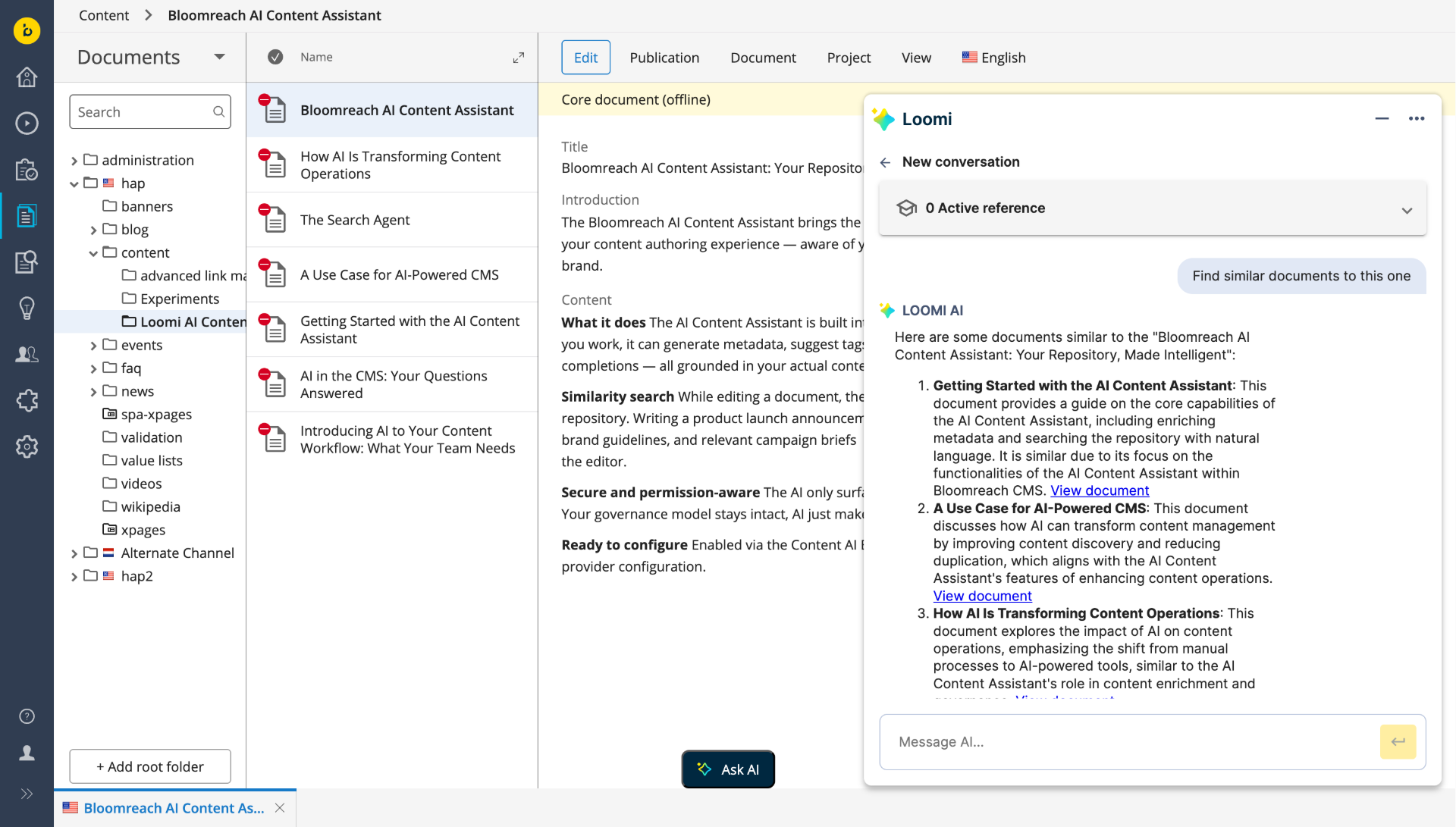
Finding similar documents based on the document currently open in the editor
- Repository-wide Natural language search (Incubating)
An early-access natural language search capability is now available for editors, allowing free-form questions about the repository content. This feature is incubating, it is subject to change, and does not guarantee coverage, accuracy, or completeness of results. We are actively working to expand and harden this capability in upcoming releases, with the goal of enabling full natural language search across your entire content repository.
Finding Similar Documents
The core capability of the Search Agent is similarity search: given the document you are currently editing, it surfaces the most semantically related content in your repository.Users can request similar documents using natural language queries, such as "Find similar documents to this." They can also refine the search by including specific keywords, for example, "Find similar documents that also contain the terms 'welcome' and 'assistant'."
-
The Search Agent aids in finding overlapping material, including documents that use different terminology or sit in different sections of the repository.
-
When something changes, when a product, policy, or term is updated, it helps identify which documents discuss similar topics so editors know where to look first.
-
For editorial planing, get a picture of existing content on a theme to inform new writing or consolidation decisions.
Results are returned as clickable links ranked by semantic relevance and open directly in the CMS editor. Up to 5 results are returned per query.
Note: Search Agent results are based on semantic similarity and are non-deterministic. They serve as a starting point for editorial exploration, not as an exhaustive or authoritative list. Do not rely on AI results for processes that require exact, complete, or fully verifiable results.
Learn more about Search Agent in the AI Content Assistant user guide.
Developer notes:
The Search Agent is built on a RAG (Retrieval-Augmented Generation) embeddings pipeline. This pipeline is the foundational capability that all future content intelligence features in brXM will build on, including the Document Agent (Q2 2026) and content governance automation (H2 2026).
Ingestion
The vector store is updated automatically when documents are changed or published, and can also be managed explicitly via updater scripts. Please note that the initial indexing of the repository must be performed by you.
Two ingestion modes are supported:
-
live : RAG contains only live content. Content is indexed upon publication.
-
preview: RAG contains unpublished content. Content is indexed on save.
Ingestion can be filtered by document type and folder path. Results are automatically filtered by the requesting user's JCR permissions.
Vector store options:
-
Redis: The tested and supported vector store implementation. Redis must be a customer-managed instance; Bloomreach does not host or manage it.
-
Self-managed (Incubating): Bring your own vector store by implementing a VectorStoreFactory.
-
Bloomreach Cloud managed vector store: : A managed vector store for Search Agent is planned for Bloomreach Cloud in Q2 2026. Please reach out to your Account Manager for more information.
For full configuration reference, supported embedding models, and setup instructions, see the AI Content Assistant initialization and configuration guide.
AI Extensibility: Custom Vector Stores and AI Tools
v16.8 adds two new extension points that give development teams control over how AI infrastructure is wired into the platform.
-
Custom vector store (Incubating)
Teams with existing vector infrastructure or specific data residency requirements can connect their own vector store to the Search Agent using the new `VectorStoreFactory` SPI.
This capability is released as incubating. The VectorStoreFactory SPI and its contracts may change between releases without prior notice.
-
Custom AI tools
The new `ClientToolPackage` SPI lets development teams register their own AI-callable actions directly in the chat assistant, for example, triggering an internal workflow, fetching data from an external system, or extending the assistant with domain-specific capabilities. Custom tools integrate cleanly with the assistant's system prompt and have access to the current user and open document context at runtime. When the Search Agent is enabled, custom tools can also call into the vector store to perform semantic searches as part of their logic, enabling advanced use cases that combine repository search with custom business actions.
What development teams can do:
-
A team integrates the assistant with an internal translation management system, editors can trigger a translation request for the current document directly from the chat, without leaving the CMS.
-
A team builds a custom compliance checker - when an editor asks, the AI searches the vector store for all documents referencing a specific term or policy and returns a structured report.
-
A team connects the assistant to their analytics platform, editors can ask how a page is performing without switching tools, with the AI pulling live data and summarising it in context.
Both extension points are Spring `@Component` beans, register an implementation and it is picked up automatically. For interface definitions, implementation guidance, and examples, see AI Module Extensibility Guide.
Try AI Content Assistant and Share Your Feedback
If the AI Content Assistant is not yet available in your project, we invite you to experience it firsthand in our demo environment and help shape its future development.
-
Try it now: Visit Bloomreach Content Demo to explore the AI Content Assistant capabilities in action.
-
Share your vision: We are committed to evolving Bloomreach Content with AI that solves your real-world challenges. We want to understand your AI vision, usage and how we can further integrate AI into your specific workflows. Please take a moment to share your feedback and ideas through our AI Adoption and Vision Survey.
Thank you for sharing your perspective!
Revision Restoration Control
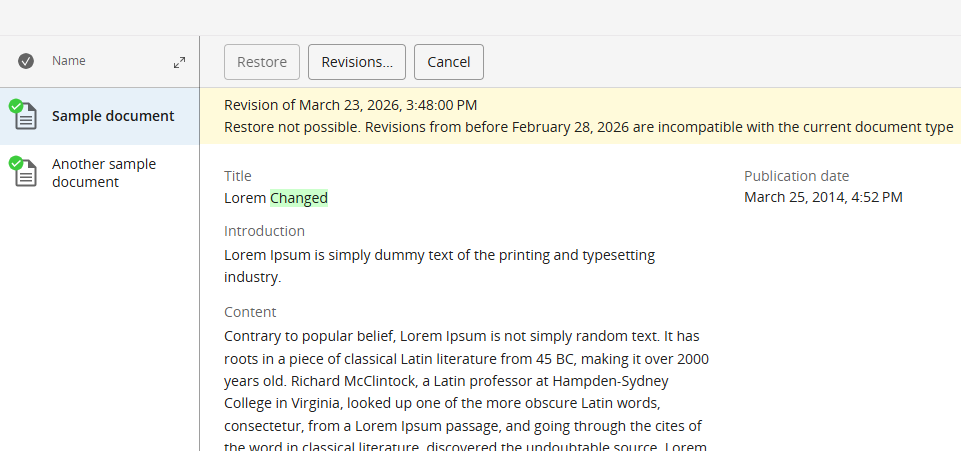
Content models evolve. When teams introduce breaking changes to document types, old revisions become dangerous: restoring a document from before a model migration can corrupt it or break dependent applications.
Administrators can now configure a date threshold below which document revisions cannot be restored. For example, a team that migrated to a new document model on January 1, 2026 sets the block at that date, editors can still browse the full history, but cannot accidentally restore a pre-migration version that would corrupt the current model.
The restriction is configured via a JCR property or system variable. The existing revision browsing UI is unaffected, editors can still view and compare any version in history.
For configuration details, please refer to the document: Configure a Revision Compatibility Date on Document Types.
Repository node type definition (CND) changes
This release introduces the following node type definition (CND) changes:
- added property hipposysedit:revisionscompatiblefrom (date) to the hipposysedit:nodetype node type definition
- added properties hippostdpubwf:publicationReason (String) and hippostdpubwf:depublicationReason (String) to the hippostdpubwf:document node type mixin definition
- added property hst:multiple (boolean) property to the hst:dynamicparameter node type definition
Important: simple rollback not supported
The above CND changes mean that an upgrade to 16.8.0 cannot be rolled back simply by redeploying the previous distribution on the already upgraded repository, by swapping binaries or containers.
If you need to downgrade, you must restore from a full repository backup taken before the upgrade.
Ongoing Enhancements and Fixes
For end users
Experience Manager
-
Drag-and-drop component reordering had a lag before the updated position was applied, reordering now registers immediately.
-
The Component Details panel failed to expand in preview mode in some configurations, it now expands consistently.
-
Editors had no way to cancel unsaved changes in Experience Manager without navigating away, a discard changes option is now available.
-
After reordering menu items, no confirmation was displayed, editors could not tell whether the change had been saved. A save notification is now shown.
-
Channel and Component properties in Experience Manager only supported selecting a single value, multiple values can now be selected from a list.
-
Dynamic parameter configuration only accepts a single value per parameter, multiple values can now be defined, enabling more flexible component parameterisation.
-
HST components configured via annotations only accept single-value parameters; annotations can now define multi-value parameters, consistent with dynamic parameter configuration.
Homepage 2.0
-
Clicking a document link in the Pending Requests widget opened the wrong document or failed to navigate. Links now open the correct document directly in the editor.
-
The 'Change Password' link remained visible after the corresponding backend configuration was removed. It is now hidden when the feature is not configured.
Content Editor
-
Switching between the Content and Experience Manager perspectives caused open document tabs to close unexpectedly, losing the editor's context; tabs are now preserved across perspective switches.
-
Resource bundles with the `${\` character pattern could not be deleted - the operation threw an error. Deletion now works correctly for all bundle names.
-
Documents with invalid or missing taxonomy category values caused a NullPointerException in the editor; these are now handled gracefully without an error.
-
In the Depublish Dialog, switching between filters (e.g. Document Status, Reference Status) caused selected document checkmarks to visually disappear while the selection count kept incrementing — making it impossible to know what would actually be taken offline. Selections now remain correctly checked when switching filters.
-
The Site References tab only showed internal component names, requiring editors to expand each row individually to find which page a component was used on. A new Location column now shows the document name inline, making it easy to see at a glance where a component is referenced.
AI Content Assistant
-
The 'Ask AI' button remained enabled while a modal dialog was open, allowing AI interactions to be triggered in an inconsistent state; the button is now disabled whenever a modal overlay is active.
-
The conversation history now shows the CMS documents visited during that session for each conversation, so editors can find the right conversation at a glance.
-
Editors can now remove a reference from an active conversation. Once deleted, the reference is excluded from all subsequent AI interactions in that session.
For developers
AI Content Assistant
-
OpenAI-compatible endpoints that expose a non-standard completions path could not be configured, blocking integration with some self-hosted models — a new `completions-path` property allows the path to be set explicitly.
-
LiteLLM was configured through the generic OpenAI-compatible connector, which made it impossible to have a separate configuration for OpenAI and LiteLLM, see multiplicity of configurations. LiteLLM now has a dedicated connector under the `spring.ai.litellm.*` property namespace. The migration is optional but recommended if you currently use LiteLLM.
-
PDF processing by the AI had no configurable size limit, large PDFs could cause memory pressure. The new `brxm.ai.pdf.max-size` property lets you cap the maximum size for AI-processed PDFs.
-
When no AI provider was configured, the platform emitted repeated ERROR-level log entries on startup, these are now logged at INFO level, reducing noise on environments without AI enabled.
OpenUI
-
OpenUI field extension values were not returned by the API when fields were rendered inside Experience Manager, values are now returned correctly regardless of rendering context.
Content model & configuration
-
In complex content models with many repeating fields, multiple "+ Add" buttons appeared close together with no way to distinguish them, editors could not tell which button was added to which field. The label on the Add button for optional and multiple-value fields (both property and node fields) is now configurable via `cluster.options.addButtonLabel`, allowing developers to set contextual labels per field.
Platform & stability
-
JCR nodes accessed via relative paths occasionally failed to resolve, causing sporadic errors in content operations. Path resolution is now reliable under concurrent load.
-
Translation operations were generating a high volume of log entries at an elevated severity level, obscuring real issues in logs. Verbosity is now reduced to appropriate levels.
-
This release includes a number of additional third-party library upgrades. The full list is available in the 16.8.0 Detailed Release Notes.
-
This release includes important security updates addressing multiple vulnerabilities. We recommend all customers upgrade to 16.8.0 promptly.
Bloomreach SPA SDK Updates
SPA SDK 27.1.0 – Angular 21 and Nuxt 4 Support
SPA SDK 27.1.0 adds support for Angular 21 and Nuxt 4, enabling development teams to build modern front-end applications using the latest framework versions. See SPA SDK 27.1.0 release notes for more details.
Bloomreach Cloud Updates
Enhanced Indexing Process
We are rolling out a new index creation process for Bloomreach Cloud (BRC) that significantly improves system stability and reliability:
-
This new solution creates a regular fresh Lucene index that can be used in deployments. This practice is key to mitigating and preventing index corruption, which could otherwise result in severe outcomes like system unavailability.
-
This results in a more reliable system for you and your team. The improved indexing process reduces the need for manual intervention and support escalations related to index issues.
Professional Services Plugin Newsletter
Folder Context Menus v7.2.0
-
Granular move/copy permissions: Folder permissions have been split into separate privileges: `folderctxmenus:copy` and `folderctxmenus:move`. Administrators can now grant copy-only or move-only access instead of all-or-nothing. The previous `folderctxmenus:editor` privilege remains for backward compatibility.
-
-Progress indicator for bulk operations: Copy and move operations now show a live progress panel with item count, percentage complete, estimated time remaining, and current path being processed. Users can cancel long-running operations mid-flight.
See the Folder Context Menus release notes for full details.
Camel Event Bus v5.3.0
Updated to support brXM 16.7.0. See the Camel Event Bus release notes for full details.
B.R.U.T. v5.2.0
Parent POM updated to brXM 16.7.0. See the B.R.U.T. release notes for full details.
Inference Engine v6.0.1
Upgraded for compatibility with brXM v16.6.4. See the Inference Engine release notes for full details.
Translations Add-on v8.0.0
Nested compound translation: Added the ability to translate nested compound types, including compounds that support re-ordering and adding items. The translation can now overwrite the target document directly.
See the Translations Add-on release notes for full details.
Text Find & Replace v4.0.1
Maintenance release upgrading the plugin for compatibility with Bloomreach Experience Manager 16.7.0 and above. See the Text Find & Replace release notes for full details.
Get help from BrXM Experts for Upgrade
The Bloomreach Professional Services team possesses extensive expertise in BrXM and has successfully executed various project implementations. Our team can facilitate a seamless upgrade of your project to the latest BrXM versions.
Additionally, we offer an Upgrade Assessment service for your projects. In just 3 days, our comprehensive evaluation will provide you with invaluable insights into your investment requirements. Our team of experts meticulously assesses your existing systems and infrastructure to determine the necessary investment for the upgrade.
The resulting detailed report encompasses the following components:
-
Executive summary
-
Overview of major changes
-
Recommended upgrade procedure
-
A comprehensive list of findings
It's important to note that the evaluation fee* is fully refundable should you decide to proceed with our Professional Services for the actual upgrade. This ensures that you not only receive top-notch guidance but also keeps your best interests in mind.
If you're interested in availing the assistance of our Professional Services team for your upgrade, please get in touch with your account manager. We're here to support your project's success every step of the way.
Notices
Important Notes for AI Module
Breaking Change - OpenAI completions path property renamed
In v16.8.0, there's a change in a configuration property for the OpenAI provider.
If you have configured a custom completions path for the OpenAI provider (e.g. when using Azure OpenAI or a compatible endpoint), the property name has changed. Update this property in your JCR configuration before upgrading.
| Before | After |
|
spring.ai.openai.chat.options.completions-path |
spring.ai.openai.chat.completions-path |
JVM default time zone on Bloomreach Cloud
When running brXM v16.x on Bloomreach Cloud, the JVM default time zone is UTC. Any date/time processing that relies on the JVM default time zone (instead of an explicitly configured one) will therefore use UTC.
Changing the time zone behavior
- CMS UI time zone
Configure the login page timezone dropdown. This allows users to select their timezone on login, defaulting to the browser timezone. It's also possible to configure a single timezone for all users.
See: Configure the CMS login page (time zone selection dropdown) - JVM default time zone
Alternatively, the timezone can be explicitly set as a JVM system property. Upload a properties file containing, for example, user.timezone=Europe/Amsterdam and configure it as a Java System Properties file during deployment.
Minor release
v16.8 is a minor release, so it is backward compatible with the previous minor release. Also, updating to this version from the previous minor version should be of little effort. Specific instructions for upgrading from v16.7 to v16.8 are available for enterprise customers (login required). Please also find the overview of minor version upgrade instructions in this major release in our documentation.
Supported Technologies
Full system requirements, including a comprehensive table of maintained third-party compatibility, are available in the system requirements documentation.
End-of-life, support and maintained code
Nomenclature refresher
As the terms ‘end-of-life’, ‘supported’, ‘maintained’ are used in various ways in our industry, we clarify the nomenclature we use for this below.
Supported product version
When a product is supported, this means that the customer will receive help from the helpdesk when issues arise as described in the service level agreement (SLA) that the customer has with Bloomreach. There are several service levels available.
Please note that if a bug is acknowledged in a supported, but not-maintained version, and a fix is needed, this fix will only be applied in the maintained product versions. This means the customer will need to move to a maintained version to receive the fix.
Maintained product version
When a product is maintained, the product code is updated and security- and bug fixes are made to the code. For maintained products, the system requirements for third party libraries and components are kept updated as well. Please note that we do not provide support for system requirement providers (e.g. databases, java, etc..), but we only support the usage for mentioned certified system requirement providers.
If a product is non-maintained, this means that the code is not maintained anymore and therefore might contain bugs and/or security vulnerabilities due to newly discovered issues in our code, or the libraries used.
End-of-life product version
Products that are not maintained and not supported are end-of-life. These might be available from our archives but could be removed without notice.
What does this mean for the current release?
Please note that this release changes existing maintenance or support modes. In the table below you can find the support status of your product and when support will end; this is dependent on the version currently being used and license level. Please note that versions that are not listed are not active and not supported, and therefore end-of-life.
|
Version |
Planned end date of |
Planned end date of |
Original major version release date |
| Latest 14.x | December 2024 | December 2025 | December 2019 |
| Latest 15.x |
December 2025 |
December 2026 |
April 2022 |
| Latest 16.x | December 2026 | December 2027 | June 2024 |
Figure: reference table of planned end of support dates based on current SLA terms. Supported versions may differ depending on contractual agreements.
The versions highlighted in orange are actively maintained and provided with bug fixes and product improvements.
Security notes
This release includes updates for third-party dependencies that have published vulnerabilities. We recommend that customers keep their systems up to date with announced product releases.
Availability
This version of brXM is available as of March 19, 2026 onwards, the release of the open source will be made available after approximately 2 years due to our release policy.