

Bloomreach Experience Manager V17.0 Release Notes
Highlights for v17.0
We are pleased to announce a new version of Bloomreach Experience Manager (brXM). This major release upgrades the platform to Java 21 and Spring Boot 4, delivers OpenTelemetry distributed tracing for production observability, modernizes the Experience Manager channels overview, rebuilds the Essentials setup wizard on Angular 21, adds the brXM Upgrade Tool as a new standalone developer tool, and introduces the brXM Performance Test Suite for measuring CMS UI and API performance. In this document we will give a brief overview of the highlights in this release. You can also find these release notes at Release Notes Overview.
Everything mentioned in this document is an integral part of Bloomreach Experience Manager (brXM), unless mentioned otherwise.
Significant Updates and New Features
Java 21 and Spring Boot 4: A Long-Term Foundation
v17.0 upgrades the platform from Java 17 to Java 21 LTS, a version with long-term support through 2030, and Spring Boot 4. This brings the platform's runtime and framework stack up to date, enabling continued security maintenance, improved performance, and compatibility with modern Java tooling.
This is a major stack upgrade. All customers need to update their project code before upgrading, as Spring Boot 4 introduces breaking API changes that may affect custom beans, configurations, and Spring AI connectors. See the Upgrade Guide for the full list of required changes.
Upgrade Tool: Tailored Step-by-Step Upgrade Plans for Your Project
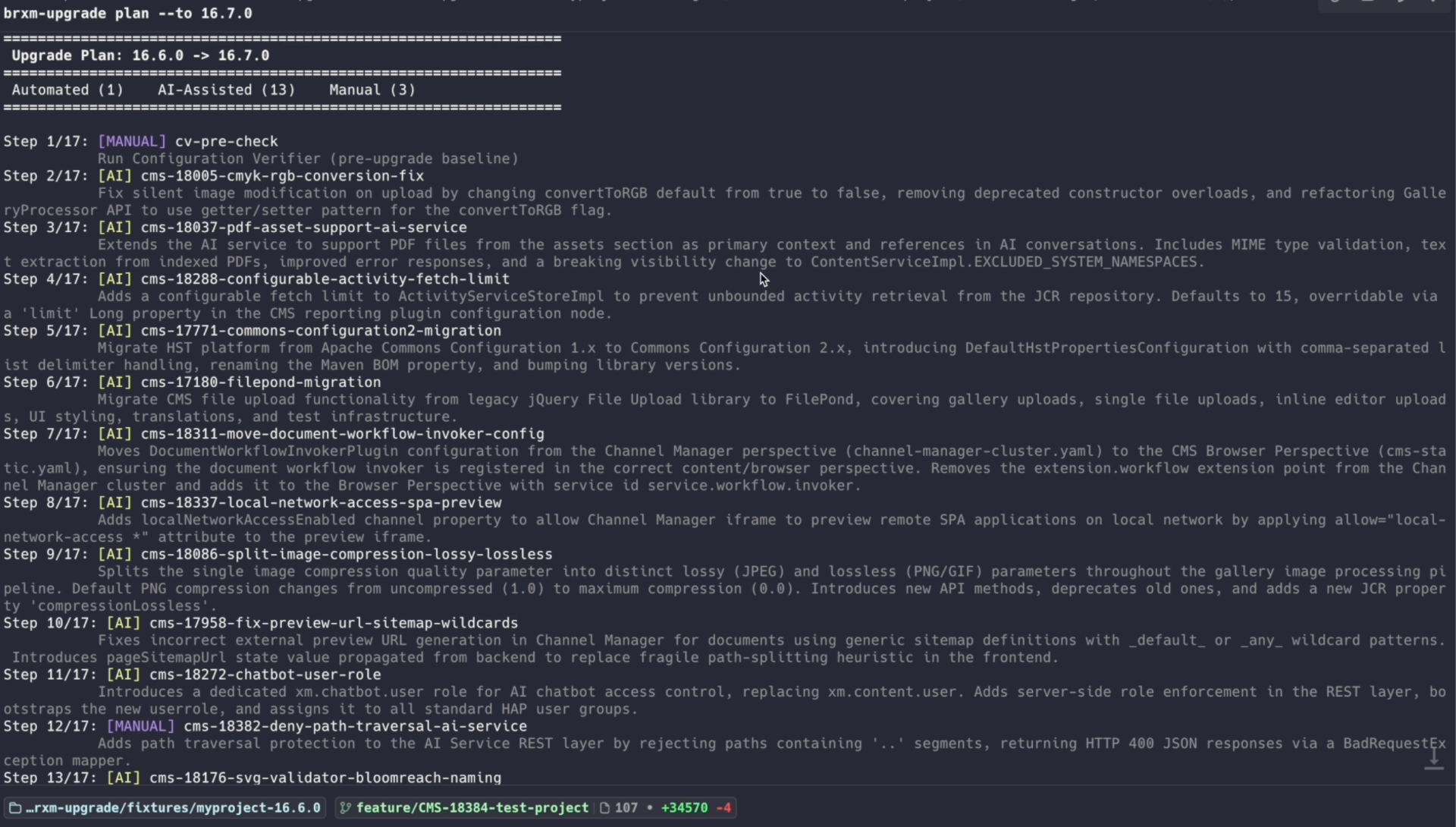
The brXM Upgrade Tool is a new standalone command-line tool that reduces the time and risk of brXM upgrades. Instead of manually working through a generic changelog, developers get a plan that is filtered to their specific project, only the changes that actually apply. It reads a curated release manifest, compares it against the project's source code, and walks through each applicable step in order, including invoking the Configuration Verifier at the appropriate points.
The tool works without AI. An optional AI component (BYOK: Anthropic, OpenAI, or Google) can generate project-specific guidance for steps that require manual code changes. The tool also supports MCP mode for use alongside AI coding assistants such as Claude Code or Cursor. Nothing is sent to Bloomreach. The tool is distributed separately via npm (npx @bloomreach/brxm-upgrade) and is not included in the standard brXM release artifact. See the Upgrade Tool documentation for installation and usage instructions.
OpenTelemetry Tracing: See What's Happening Inside Your CMS
v17.0 adds native OpenTelemetry support, enabling teams to diagnose slow editorial operations and production incidents with the same tools they already use for the rest of their stack. Distributed traces are collected automatically and sent to any compatible backend: Honeycomb, Datadog, Grafana Tempo, Jaeger, New Relic, or any OTLP-compatible platform.
Beyond standard auto-instrumentation, brXM enriches each trace with CMS-specific context: the logged-in user, the editorial action that triggered the request, and, for slow requests, a full breakdown of the internal CMS task tree. This makes it possible to connect backend performance data directly to editorial workflows.
The feature is opt-in and requires no code changes. See the OpenTelemetry integration documentation for configuration instructions.
Bloomreach Cloud: OpenTelemetry tracing is not yet available for Bloomreach Cloud environments. It is expected by the end of Q2 2026. Cloud customers who want to enable tracing should contact Bloomreach Support for more information.
Performance Test Suite: Measure and Validate CMS Performance Against a Known Baseline
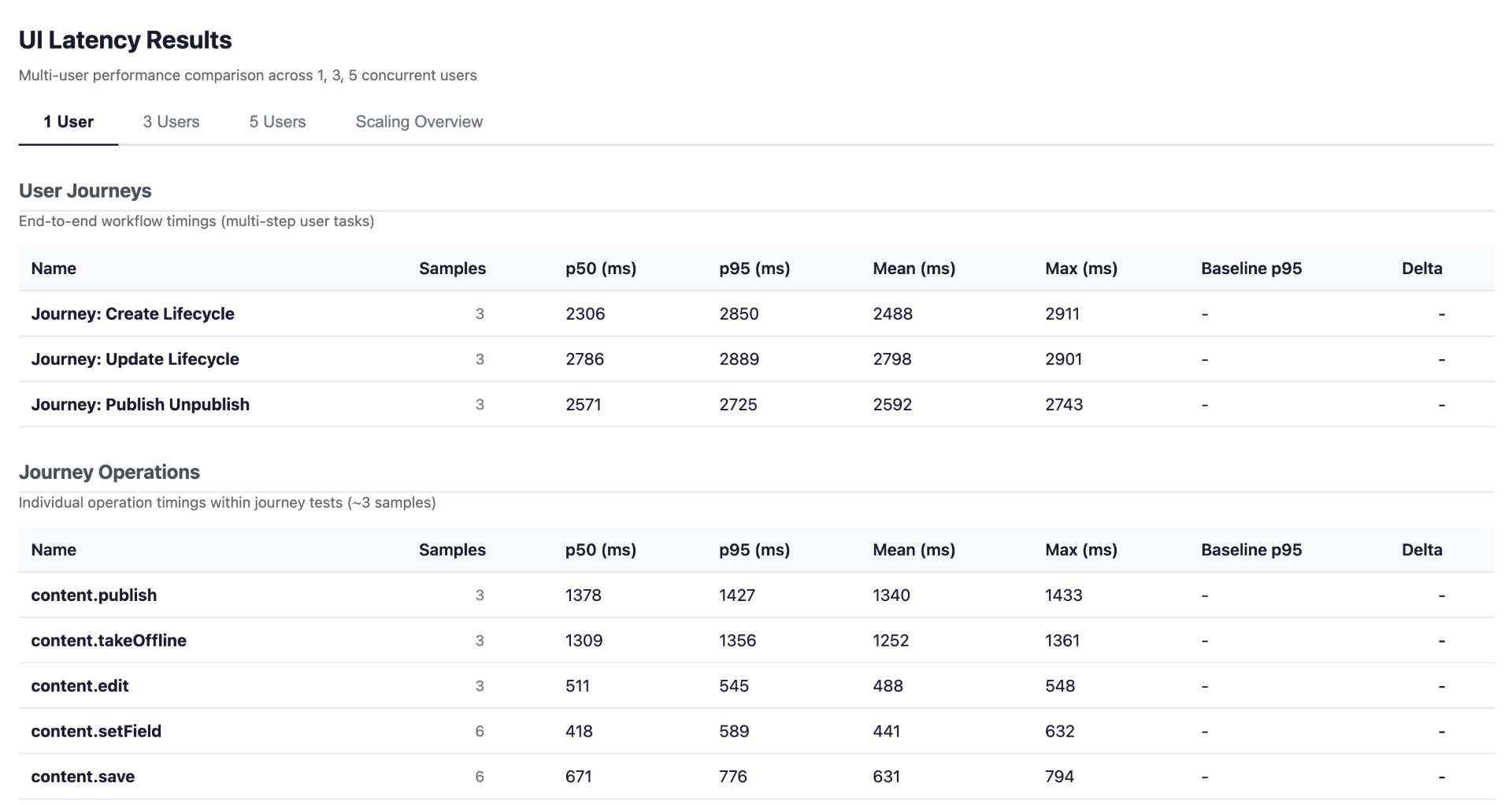
The brXM Performance Test Suite is a new standalone test kit that gives teams a repeatable way to catch performance regressions before they reach production. It covers UI latency (Playwright) and API load (Gatling) including concurrent user scenarios, compares results against named baselines, and generates a dashboard with results and a regression verdict.
The kit is distributed separately from the brXM release artifact. See more information in Performance Test Suite documentation.
Workflow Comments: Capture the Why Behind Workflow Decisions
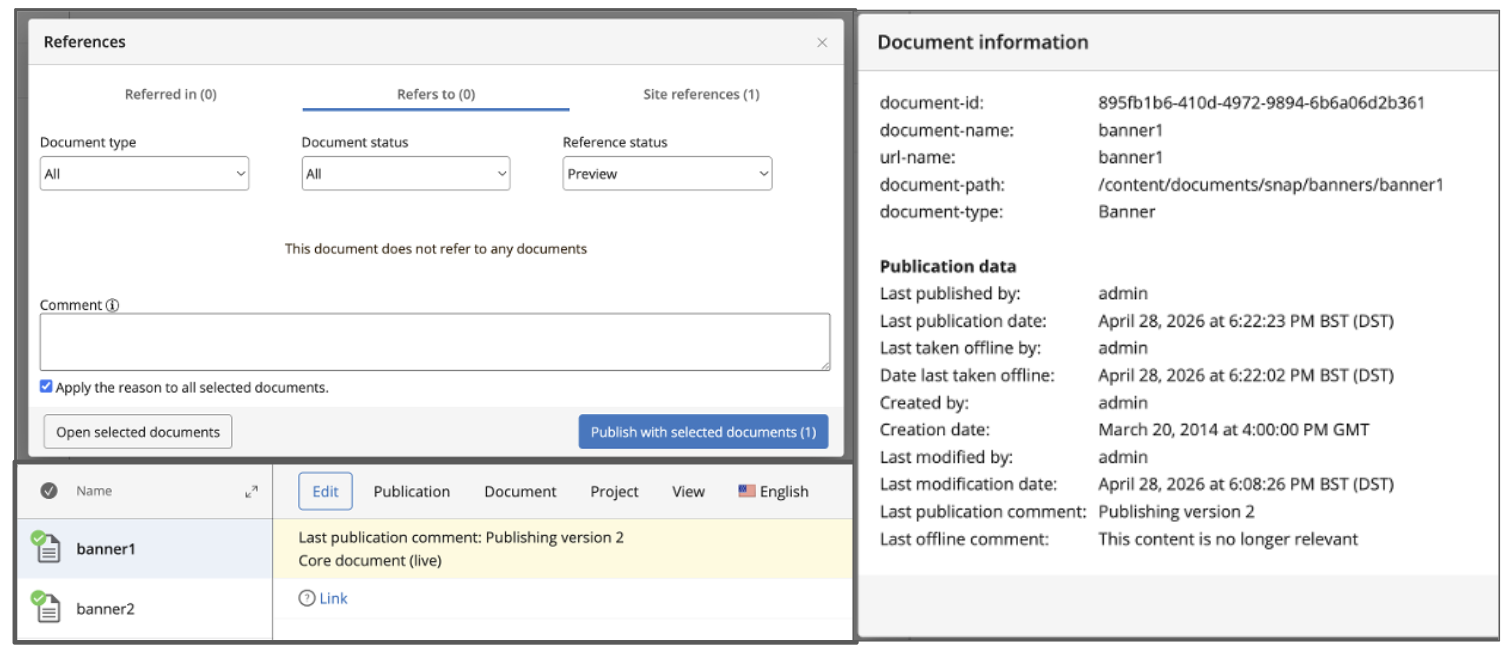
Editors and authors can now leave a comment when publishing or taking a document offline, creating a lightweight audit trail without requiring a separate workflow process. Comments appear in the document ribbon, Document Information dialog, Revision History, and workflow request dialogs.
The feature is disabled by default and must be enabled via configuration. See Workflow Commenting feature for setup instructions.
Experience Manager: Modernized Channels Overview
The Channel Overview in Experience Manager has been modernized. The previous implementation was built on ExtJS, a legacy framework that had accumulated stability issues in channel creation, navigation, browser history, and error handling. The new implementation replaces that layer with a modern Angular based architecture. Editors will notice a more stable and predictable Experience Manager across all channel operations.
Essentials: Setup Wizard Rebuilt on Modern Angular
The Essentials setup wizard has been rebuilt from the ground up on Angular 21, replacing the legacy AngularJS implementation. The wizard is the starting point developers use to add features and configure a new brXM project, and the previous AngularJS version had reached end of life with no further framework support.
The new implementation uses the same Angular version as the rest of the modern brXM frontend, simplifying maintenance and making the tooling consistent for developers working across the CMS UI.
Ongoing Enhancements and Fixes
For end users
Taxonomy
-
Renaming taxonomy URL names is now disabled, preventing inconsistencies in taxonomy key references.
-
Copy, move, and delete operations on taxonomy documents are now correctly restricted, preventing unintended structural changes to the taxonomies and related documents.
For developers
AI Content Assistant
-
The configuration bootstrapping for AI features has been improved, making initial setup more straightforward for new AI deployments.
Content REST API
-
Breaking change: hippostdpubwf:publishedBy and related internal workflow fields are no longer exposed via the Content REST API, preventing user identity leakage. These fields will no longer appear in the API response. Delivery applications that read them will not receive an error, the fields will simply be missing, which may cause silent failures in code that depends on them. See more details in the Notices section below.
Platform and stability
-
An issue where publish workflow events emitted an empty string rather than null as an argument has been corrected, restoring correct behaviour for custom workflow event listeners that distinguish immediate from scheduled publish.
-
An InvalidItemStateException that could occur intermittently following a JCR node access via relative path has been resolved.
-
The Chinese (Simplified) UI translation has been removed.
-
This release includes a large number of additional third-party library upgrades as part of the Spring Boot 4 migration. The full list is available in the 17.0.0 Detailed Release Notes.
Bloomreach Cloud Updates
OpenTelemetry Log Streaming: Visibility Into Your Cloud Environment Via Your Existing Observability Platform
Bloomreach Cloud customers can now route application logs directly to their existing observability platform, giving them full visibility into CMS behavior without leaving their tooling of choice. Logs are exported via OTLP and are compatible with Dynatrace, Splunk, Grafana Cloud, and any OTLP-compatible platform.
This is an opt-in feature enabled per stack. See more information about this feature in OpenTelemetry Log Streaming.
To get started, contact Bloomreach Support.
Get help from Bloomreach Content Experts for Upgrade
The Bloomreach Professional Services team possesses extensive expertise in Bloomreach Content and has successfully executed various project implementations. Our team can facilitate a seamless upgrade of your project to the latest BrXM versions.
Additionally, we offer an Upgrade Assessment service for your projects. In just 3 days, our comprehensive evaluation will provide you with invaluable insights into your investment requirements. Our team of experts meticulously assesses your existing systems and infrastructure to determine the necessary investment for the upgrade.
The resulting detailed report encompasses the following components:
-
Executive summary
-
Overview of major changes
-
Recommended upgrade procedure
-
A comprehensive list of findings
It's important to note that the evaluation fee* is fully refundable should you decide to proceed with our Professional Services for the actual upgrade. This ensures that you not only receive top-notch guidance but also keeps your best interests in mind.
If you're interested in availing the assistance of our Professional Services team for your upgrade, please get in touch with your account manager. We're here to support your project's success every step of the way.
Notices
Content REST API: Workflow Fields Removed
The following internal workflow fields are no longer returned by the Content REST API as of v17.0:
-
hippostdpubwf:publishedBy
-
hippostdpubwf:depublishedBy
-
hippostdpubwf:publicationReason
-
hippostdpubwf:depublicationReason
These fields were never part of the documented public API contract, but were visible in API responses. Removing them prevents user identity leakage in delivery applications.
Impact: Delivery applications that read any of these fields from the Content REST API response will silently receive no value after upgrading. There is no error or warning. Review your delivery-layer code before upgrading and remove any references to these fields.
Removed modules
Targeting demo support modules
The hippo-addon-targeting-demo-support module and its submodules (data-loader, data-generator) have been removed from the brXM repository. These modules were used for demo and test data generation only and were not intended for production use.
Action required: Remove any references to the following artifacts from your project's pom.xml before upgrading:
-
com.onehippo.cms7:hippo-addon-targeting-demo-support-data-loader
-
com.onehippo.cms7:hippo-addon-targeting-demo-support-data-generator
Projects that reference these artifacts will fail to build against brXM 17.0.0.
Chinese (Simplified) UI translation
The Chinese (Simplified) translation files (_zh variants) have been removed from brXM. The CMS UI will fall back to English for any labels that previously had a Chinese translation. Custom translations added by your project are not affected by this removal.
Custom Essentials Plugin Frontend Components
The Essentials setup wizard has been rebuilt on Angular 21, replacing the legacy AngularJS implementation. Custom Essentials plugins that include a frontend component, an AngularJS controller registered to the hippo.essentials module and an HTML fragment packaged as a web fragment under META-INF/resources will no longer work after upgrading.
Action required (if applicable): Review your project for custom Essentials plugins with frontend components and rewrite them for Angular 21 before upgrading.
Major release
v17.0.0 is a major release. It introduces breaking changes in the Java runtime requirement, Spring framework versions, and CMS module structure. A detailed upgrade guide is available: Upgrade to brXM 17. Review the upgrade guide carefully before upgrading, and plan for additional testing time compared to a minor release. Please also find the overview of minor version upgrade instructions in this major release in our documentation.
Supported Technologies
Full system requirements, including a comprehensive table of maintained third-party compatibility, are available in the system requirements documentation.
End-of-life, support and maintained code
Nomenclature refresher
As the terms ‘end-of-life’, ‘supported’, ‘maintained’ are used in various ways in our industry, we clarify the nomenclature we use for this below.
Supported product version
When a product is supported, this means that the customer will receive help from the helpdesk when issues arise as described in the service level agreement (SLA) that the customer has with Bloomreach. There are several service levels available.
Please note that if a bug is acknowledged in a supported, but not-maintained version, and a fix is needed, this fix will only be applied in the maintained product versions. This means the customer will need to move to a maintained version to receive the fix.
Maintained product version
When a product is maintained, the product code is updated and security- and bug fixes are made to the code. For maintained products, the system requirements for third party libraries and components are kept updated as well. Please note that we do not provide support for system requirement providers (e.g. databases, java, etc..), but we only support the usage for mentioned certified system requirement providers.
If a product is non-maintained, this means that the code is not maintained anymore and therefore might contain bugs and/or security vulnerabilities due to newly discovered issues in our code, or the libraries used.
End-of-life product version
Products that are not maintained and not supported are end-of-life. These might be available from our archives but could be removed without notice.
What does this mean for the current release?
Please note that this release changes existing maintenance or support modes. In the table below you can find the support status of your product and when support will end; this is dependent on the version currently being used and license level. Please note that versions that are not listed are not active and not supported, and therefore end-of-life.
|
Version |
Planned end date of Standard Support |
Planned end date of Premium Plus Support |
Original major version release date |
|
Latest 14.x |
December 2024 |
December 2025 |
Dec 2019 |
|
Latest 15.x |
December 2025 |
December 2026 |
April 2022 |
|
Latest 16.x |
December 2026 |
December 2027 |
June 2024 |
|
Latest 17.x |
December 2027 |
December 2028 |
May 2026 |
Figure: reference table of planned end of support dates based on current SLA terms. Supported versions may differ depending on contractual agreements.
The versions highlighted in orange are actively maintained and provided with bug fixes and product improvements.
Security notes
This release includes updates for third-party dependencies that have published vulnerabilities. We recommend that customers keep their systems up to date with announced product releases.
Availability
This version of brXM is available as of May 4, 2026 onwards, the release of the open source will be made available after approximately 2 years due to our release policy.