

Single Sign-On (SSO)
Introduction
Goal
Understand how Bloomreach Experience Manager's architecture supports single sign-on integration in enterprise environments.
Background
Organizations who implement Bloomreach Experience Manager in their enterprise environment may want to integrate with their existing single sign-on (SSO) solution. This page explains how Bloomreach Experience Manager's system architecture supports SSO integration. Specific integrations are described separately.
Implementing SSO in brXM can be achieved in multiple ways. The implementation will differ depending on SSO provider, requirements and libraries involved. Because of that providing a single solution that fits all is not possible. Our best effort is to describe a general architecture and the concepts involved, along with attention points that an implementor should be familiar with and adapt them accordingly.
Enterprise SSO-Enabled Architecture
The deployment diagram below shows Bloomreach Experience Manager's SSO-enabled system architecture.
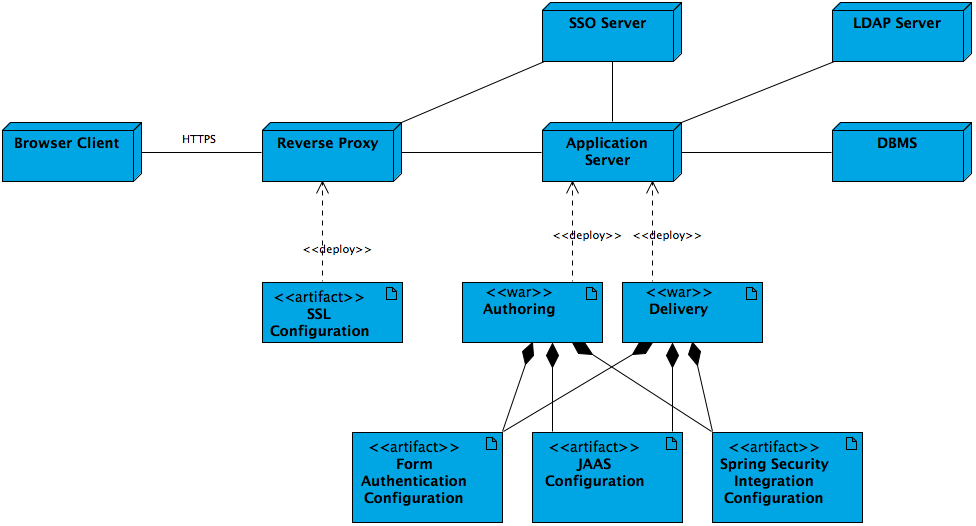
- Typically the HTTPS connection for browser clients is configured and enabled in the reverse proxy layer (Apache Web Server).
- Typically the reverse proxy redirects client requests to the enterprise SSO server for authentication. Once authenticated, the request is redirected back with a valid security token.
- Applications running on the application server can access the enterprise SSO server to validate security tokens if needed.
- Alternatively the authoring and delivery applications running on the application server can also authenticate users against the LDAP server if configured.
- Alternatively the authoring and delivery applications running on the application server can also authenticate users through either form authentication, JAAS or Spring Security integration. Spring Security integration is capable of integrating with an enterprise SSO server seamlessly.
Authentication Mechanisms
It is important to understand the differences between OOTB and SSO authentication. In a normal scenario user managment and authorisation is handled in the context of the CMS. In a SSO, however, the user and rights managment is happening in separate systems. Commonly users are managed in an LDAP server and the SSO server integrates authentication and authorisation in a centralised way. Which means the CMS will require an LDAP integration as described here and an SSO integration which is the topic of this document.
General concepts of SSO implementation
-
Provider - depending on the system you are integrating different set up requirements will be needed. Some examples include Okta, Microsoft Entra ID and Keycloak.
-
Keystore - generating and providing your local key and certificate for the encryption of the SAML exhanges.
-
Metadata - this is typically a URL from where the metadata of the provider can be retrieve from. These metadata include information like entityID, login URL, provider key etc. that are necessary for establishing the communication. Spring security libraries often handle this for you.
-
Security Configuration - XML or DSL way of providing the relevant configuration in spring security.
-
SSO Login Filter - a filter is registered as part of the security configuration and gets invoked as part of the filter chain for secured resources.
-
Custom security provider - the default security provider used in the CMS has a user manager which by default authenticates users by repository authentication. An additional security provider usually needs to be configured, which overrides the authentication method to validate the authentication made through SSO.
-
web.xml / ContextLoadListener - if your project is prior to v15 or in case you are excluding the integrated CMS Spring Boot you can instantiate a Spring context by registering a ContextLoadListener in the web.xml of your CMS application. If your project is v15 and you want to utilise the integrated Spring Boot then you cannot use a ContextLoadListener and you have to take into consideration this documentation page.
- Logout - A logout URL needs to be configured and it should be different from the login URL to avoid creating a circle.
Attention points
-
Libraries - depending on the provider, protocol, and application that you are implementing SSO for you will require different libraries. Make sure to follow best practices with proper version definition, avoiding duplicates and excluding what's not necessary.
-
Configuration and parameters - make sure that you adapt the samples according to your requirements and cases. Don't forget to update files and values that are specific per implementation.
-
XML/DSL configuration - either way of providing configuration is possible. The XML is considered legacy and potentially convoluted. The DSL is cleaner and easier to read.
Requests to Exclude
Requests to the following paths should not be redirected to the enterprise SSO server:
- /cms/ws/indexexport (Lucene index export)
- /cms/ping (CMS Ping Filter)
Requests to the following paths are usally not redirected to the enterprise SSO server, and CMS local login is used to access them:
- /cms/repository (Repository Servlet)
- /cms/logging (Logging Servlet)
Specific Integrations
- Spring Security/OAuth SSO Integration
- Shibboleth/SAML SSO Integration (legacy approach)