

Bloomreach Experience Manager V16.2 Release Notes
Highlights for v16.2
We are pleased to announce a new version of Bloomreach Experience Manager (brXM). This minor release introduces new features, a number of useful technical stack upgrades and improvements to the product. In this document we will give a brief overview of the highlights in this release. You can also find these release notes at: https://xmdocumentation.bloomreach.com/about/release-notes/release-notes-overview.html
Everything mentioned in this document is an integral part of Bloomreach Experience Manager (brXM), unless mentioned otherwise.
Discover the Power of Advanced Link Management
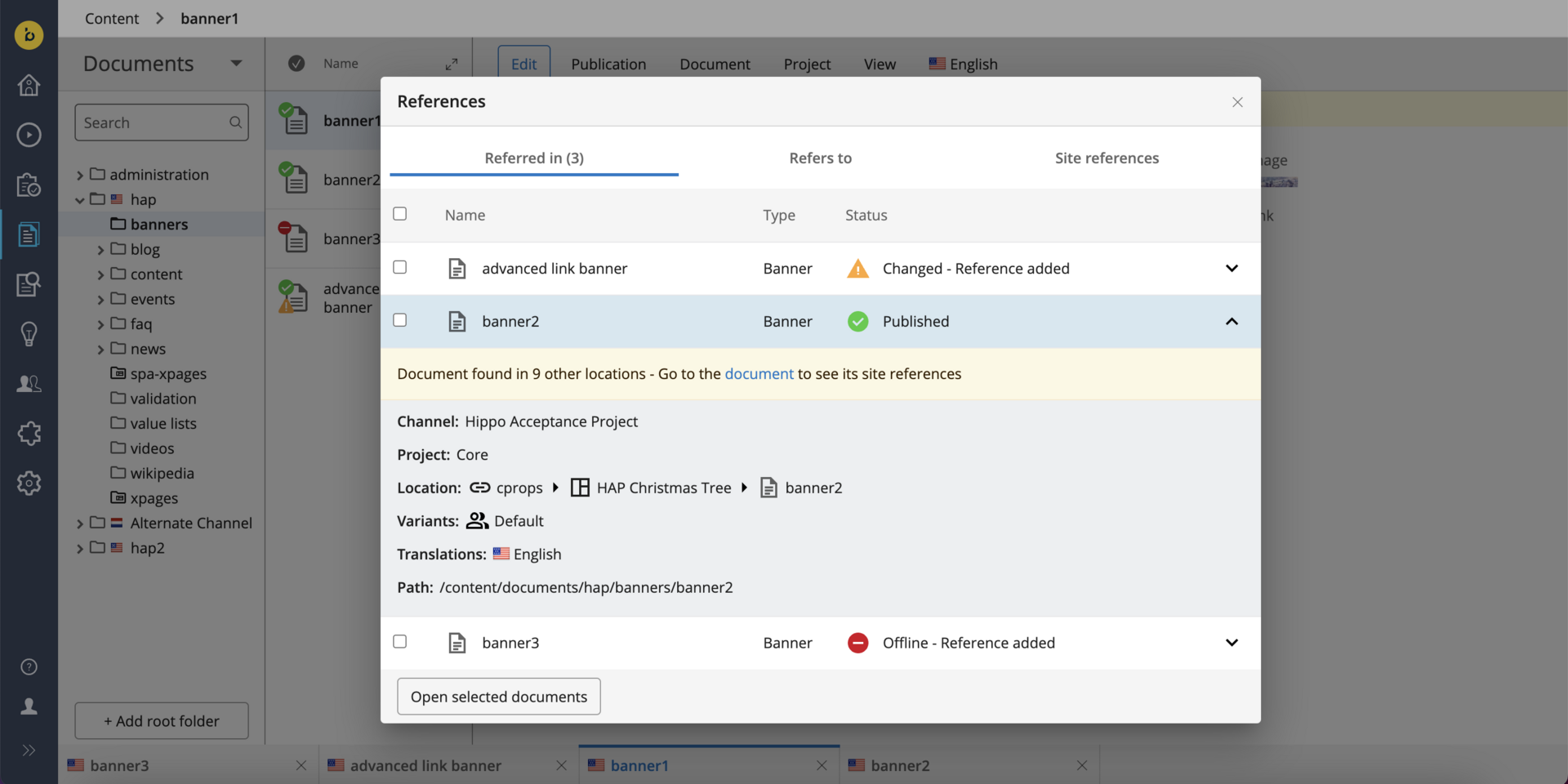
The new advanced link management feature in Bloomreach Experience Manager (BrXM) is designed to enhance the visibility and management of references to documents, images and assets across components, pages and projects. This feature aims to support editors and authors in their daily tasks by providing better tracking. The next version of the feature will also provide more capabilities for workflow management for references.
What does this feature do?
The advanced link management feature allows users to:
-
Track and manage where specific documents, images, or assets are used across the platform.
-
Identify the impact of changes made to a document or asset on related pages or components.
-
[Upcoming in v16.3] Support concurrent publication workflows for direct references, reducing manual efforts and potential human errors.
Benefits
The benefits of the advanced link management feature include:
-
Improved visibility for documents and assets referenced in components, documents, and pages, facilitating easy tracking and management.
-
Streamlined concurrent publication workflows for referenced documents, eliminating manual efforts and human mistakes.
-
Increased efficiency and accuracy in content management processes, benefiting both editors and authors.
You can find more information about this feature in our documentation.[1]
Boost Your Efficiency with Performance Improvements
With our commitment to improving the performance of the CMS, we have introduced several enhancements in the latest release. These improvements are designed to optimize system efficiency and provide a smoother user experience.
Improved Folder Expansion
In previous versions, users experienced long delays when quickly expanding multiple folders in the content perspective. This issue has been resolved by optimizing the FolderTreeNode implementation to avoid unnecessary loading. The new implementation reduces the number of database calls and improves the responsiveness of the folder expansion. This enhancement ensures that the delay in expanding folders is minimized and provides a smoother user experience.
Optimized Translation Queries
Previously, every logged-in CMS user had to individually query for translations of a folder or document, resulting in multiple queries and significant congestion in Lucene, especially with more than 100 users. This inefficiency has been addressed by introducing a shared DocumentTranslationsService backed by a single system session. This service caches results and invalidates them when necessary, significantly reducing the load on the system and improving performance.
Ongoing Enhancements and Fixes
For end users
-
We fixed the issue where switching between the channel manager (experience manager) and content perspective via NavApp caused the CMS to stop responding.
-
We improved the UI to rename 'Published date' to 'Last published date' and ensure this information is always visible, even when a document is unpublished.
-
We fixed the bug that prevented adding new content blocks, optional compounds, and multi-value properties from the Visual Editor.
-
A bug where experiments on a component were locked by a single user, preventing other users from performing any experiment-related actions is resolved.
For developers
-
We enhanced the DerivedDataFunction to access the jcr:path attribute, allowing for more efficient filtering by publication type.
-
We corrected the log configuration files in the archetype of v16 to use 'jakarta.ws.rs.core' instead of 'javax.ws.rs.core'.
-
We fixed the issue where adding an Upload PreProcessor in version 16.1.0 prevented any asset or image uploads.
-
The problem where documents with large text fields could not be saved due to a 'Request header is too large' error is resolved.
-
We addressed the issue where multiple replication journal entries were created unnecessarily.
Bloomreach SPA SDK Updates
The latest Bloomreach SPA SDK release, v24.0.0[2], supports Angular 18.
Get help from BrXM Experts for Upgrade
The Bloomreach Professional Services team possesses extensive expertise in BrXM and has successfully executed various project implementations. Our team can facilitate a seamless upgrade of your project to the latest BrXM versions.
Additionally, we offer an Upgrade Assessment service for your projects. In just 3 days, our comprehensive evaluation will provide you with invaluable insights into your investment requirements. Our team of experts meticulously assesses your existing systems and infrastructure to determine the necessary investment for the upgrade.
The resulting detailed report encompasses the following components:
-
Executive summary
-
Overview of major changes
-
Recommended upgrade procedure
-
A comprehensive list of findings
It's important to note that the evaluation fee* is fully refundable should you decide to proceed with our Professional Services for the actual upgrade. This ensures that you not only receive top-notch guidance but also keeps your best interests in mind.
If you're interested in availing the assistance of our Professional Services team for your upgrade, please get in touch with your account manager. We're here to support your project's success every step of the way.
Notices
Update on Usage Statistics
Please be aware that an outdated usage statistics module has been replaced. As a result, you may encounter errors in the network tab of your browser. This module has been removed in versions v16.2, v15.7.1, and v14.7.23. To avoid these errors, you can upgrade to one of these versions or consider completely disabling the collection of statistics. For more information on usage statistics, please refer to the documentation[3].
Update on Standard Support for BrXM v14
As of December 2024, BrXM v14 no longer receives Standard support. To maintain uninterrupted support and access new features, please upgrade to BrXM v15 or v16. V14 will continue to be supported by Premium Support till December 2025.
Options:
-
Plan Your Upgrade: Begin preparations to ensure a smooth transition before the end of year. For help with the upgrade, reach out to your Account Manager.
-
Upgrade to Premium Support: Reach out to your Account Manager.
Update to Access for Issue Tracking in JIRA
As part of our commitment to enhancing security and process efficiency, we transitioned to a private cloud-based Jira instance, which will no longer be accessible to customers for direct issue reporting or tracking. Previously, issues.onehippo.com provided limited visibility into certain issues, though security and enterprise-specific items were always restricted.
We kindly ask that you direct any product questions, issue reports, or feature requests to our support team at support.bloomreach.com. Our support team will ensure your inquiries are addressed promptly and will escalate them to the appropriate internal teams as necessary, providing regular status updates as they progress.
JVM default time zone on Bloomreach Cloud
When running brXM v16.x on Bloomreach Cloud, the JVM default time zone is UTC. Any date/time processing that relies on the JVM default time zone (instead of an explicitly configured one) will therefore use UTC.
Changing the time zone behavior
- CMS UI time zone
Configure the login page timezone dropdown. This allows users to select their timezone on login, defaulting to the browser timezone. It's also possible to configure a single timezone for all users.
See: Configure the CMS login page (time zone selection dropdown) - JVM default time zone
Alternatively, the timezone can be explicitly set as a JVM system property. Upload a properties file containing, for example, user.timezone=Europe/Amsterdam and configure it as a Java System Properties file during deployment.
Minor release
v16.2 is a minor release, so it is backward compatible with the previous minor release. Also, updating to this version from the previous minor version should be of little effort. Specific upgrade instructions for this release can be found in our documentation[4] for enterprise customers (requires a login). An overview of all upgrade instructions for minor versions in this major release can also be found in our documentation [5].
Supported Technologies
The full system requirements can be found in the online system requirements [6]. This page also includes a detailed table of maintained third-party compatibility.
End-of-life, support and maintained code
Nomenclature refresher
As the terms ‘end-of-life’, ‘supported’, ‘maintained’ are used in various ways in our industry, we clarify the nomenclature we use for this below.
Supported product version
When a product is supported, this means that the customer will receive help from the helpdesk when issues arise as described in the service level agreement (SLA) that the customer has with Bloomreach. There are several service levels available.
Please note that if a bug is acknowledged in a supported, but not-maintained version, and a fix is needed, this fix will only be applied in the maintained product versions. This means the customer will need to move to a maintained version to receive the fix.
Maintained product version
When a product is maintained, the product code is updated and security- and bug fixes are made to the code. For maintained products, the system requirements for third party libraries and components are kept updated as well. Please note that we do not provide support for system requirement providers (e.g. databases, java, etc..), but we only support the usage for mentioned certified system requirement providers.
If a product is non-maintained, this means that the code is not maintained anymore and therefore might contain bugs and/or security vulnerabilities due to newly discovered issues in our code, or the libraries used.
End-of-life product version
Products that are not maintained and not supported are end-of-life. These might be available from our archives but could be removed without notice.
What does this mean for the current release?
Please note that this release changes existing maintenance or support modes. In the table below you can find the support status of your product and when support will end; this is dependent on the version currently being used and license level. Please note that versions that are not listed are not active and not supported, and therefore end-of-life.
|
Version |
Planned end date of |
Planned end date of |
Original major version release date |
|
12.6 |
No Support |
No support |
July 2017 |
|
13.4 |
No Support |
No support |
January 2019 |
| 14.7 | December 2024 | December 2025 | December 2019 |
|
15.7 |
December 2025 |
December 2026 |
April 2022 |
| 16.2 | December 2026 | December 2027 | June 2024 |
Figure: reference table of planned end of support dates based on current SLA terms. Supported versions may differ depending on contractual agreements.
The versions highlighted in orange are actively maintained and provided with bug fixes and product improvements.
Security notes
This release includes updates for third-party dependencies that have published vulnerabilities. We recommend that customers keep their systems up to date with announced product releases.
Availability
This version of brXM is available as of January 29, 2025 onwards, the release of the open source will be made available after approximately 2 years due to our release policy.
Links
[1] https://xmdocumentation.bloomreach.com/library/end-user-manual/references-in-content.html
[2] https://github.com/bloomreach/spa-sdk/releases
[3] https://xmdocumentation.bloomreach.com/library/concepts/usage-statistics/usage-statistics.html
[4] https://xmdocumentation.bloomreach.com/library/upgrade-minor-versions/upgrade-16.1-to-16.2.html
[5] https://xmdocumentation.bloomreach.com/about/upgrade/introduction.html
[6] https://documentation.bloomreach.com/library/about/system-requirements.html