

Discovery Plugin
brxm-discovery connects Bloomreach Discovery to Bloomreach Experience Manager (brXM). Discovery is Bloomreach's search and merchandising engine - it indexes your product catalog and powers keyword search, category browse, autosuggest, recommendation widgets, and visual (image-based) search. brXM is the content and page-composition layer: HST components render pages, editors manage content in Channel Manager, and the Page Model API feeds headless and SPA front ends.
This plugin is the integration between the two: a set of HST components, CMS editor extensions, and a server-side transport layer that call the Discovery API on your site's behalf, so no Discovery credentials are ever exposed to the browser.
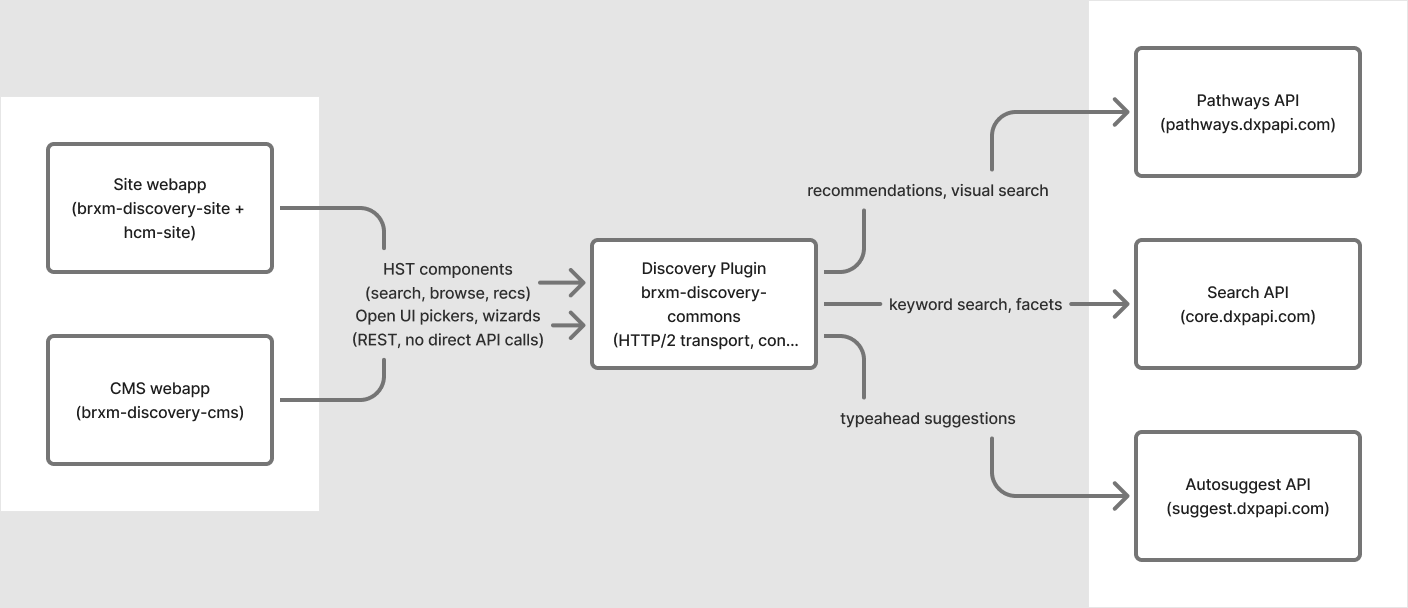
What the plugin provides
- Search & browse - keyword search and category browse pages with server-built facets, pagination, sort, did-you-mean, and keyword-redirect handling.
- Autosuggest - a search bar component with a live typeahead dropdown (query, attribute, and product suggestions).
- Recommendations - four widget types (product-keyed, category-keyed, global/personalized, and keyword-keyed), each configurable by content editors without code changes.
- Visual search - shoppers can search by uploading a photo; the plugin proxies the upload so Discovery credentials stay server-side.
- Editorial curation - hand-picked product and category highlight components for merchandising slots that don't need to be algorithmic.
- CMS editor tooling - Open UI pickers and step-by-step wizards for selecting products, categories, and recommendation widgets, embedded directly in document editing.
- Analytics - a server-side pixel service that reports impressions, clicks, and page views back to Discovery for ranking and A/B testing, with consent-gating support.
- Headless-ready - every component exposes its data through the Page Model API in addition to Freemarker, so the same components can power a traditional site or a decoupled React/SPA front end.
Discovery itself is read-only from the plugin's perspective - your product catalog is synced into Discovery by your commerce platform's connector; this plugin only queries and displays what's already indexed.
Requirements
| Requirement | Version |
|---|---|
| brXM / Bloomreach Experience Manager | 17.0.0 |
| Java | 17 (LTS) |
| Maven | 3.8+ |
| A Bloomreach Discovery account | with a provisioned account ID and domain key |
The plugin runs across brXM's two separate runtimes - the CMS webapp and the site webapp - each with its own artifact. See Installation.
Module overview
| Module | Artifact | Runs in |
|---|---|---|
| Commons | brxm-discovery-commons | Both runtimes (transitive dependency) |
| CMS | brxm-discovery-cms | CMS webapp |
| Site | brxm-discovery-site | Site webapp |
| HCM Site | brxm-discovery-hcm-site | Bundled automatically via the site artifact |
Where to go next
| Task | Page |
|---|---|
| Add the plugin to your project | Installation |
| Set up Discovery credentials | Configuration |
| Place search, browse, or recommendation components on a page | Component Parameters |
| Set up recommendation widgets or visual search | Recommendations & Visual Search |
| Let editors pick products, categories, and widgets in the CMS | CMS Document Types & Pickers |
| Configure analytics and consent | Pixel Tracking & Consent |