

Installing The Discovery Plugin
ON THIS PAGE
- Prerequisites
- Step 1 - Add the Maven repositories
- Step 2 - Add the plugin dependencies
- What each artifact provides
- What bootstraps automatically
- Headful setups - bean scanning
- Verifying the installation
Prerequisites
| Requirement | Version |
|---|---|
| brXM / Bloomreach Experience Manager | 17.0.0 |
| Java | 17 (LTS) |
| Maven | 3.8+ |
| Runtime model | separate CMS and site webapps (brXM's standard two-runtime deployment) |
You will also need a Bloomreach Discovery account with an Account ID, Domain Key, and API Key. See API Key Management to generate or retrieve these values.
Step 1 - Add the Maven repositories
If they aren't already present in your project:
<repository>
  <id>bloomreach</id>
  <url>https://maven.bloomreach.com/maven2/</url>
</repository>
<repository>
  <id>bloomreach-enterprise</id>
  <url>https://maven.bloomreach.com/maven2-enterprise/</url>
</repository>
Step 2 - Add the plugin dependencies
brXM loads CMS and site code in separate runtimes, so there is no single universal artifact — each runtime gets its own dependency.
In your root POM's <dependencyManagement>:
<dependency>
  <groupId>org.bloomreach.forge.discovery</groupId>
  <artifactId>brxm-discovery-cms</artifactId>
  <version>0.1.0</version>
</dependency>
<dependency>
  <groupId>org.bloomreach.forge.discovery</groupId>
  <artifactId>brxm-discovery-site</artifactId>
  <version>0.1.0</version>
</dependency>
Then add each artifact to the matching module:
| Artifact | Add to |
|---|---|
| brxm-discovery-cms | Your CMS dependencies POM (the module that feeds cms.war) |
| brxm-discovery-site | Your site webapp |
| brxm-discovery-site | Your site/components module, if it exists, whenever it compiles custom Java against plugin classes |
You do not need to add brxm-discovery-hcm-site separately - it is pulled in automatically by brxm-discovery-site.
What each artifact provides
brxm-discovery-cms
- The brxdis:discoveryConfig JCR node type and its CMS editor template
- The picker daemon, which registers a REST endpoint at {cms}/ws/discovery/picker
- The Open UI picker and wizard extensions used by document editors
- The static picker UI assets served at {cms}/discovery-picker/
brxm-discovery-site
- The runtime entry point: Spring beans, the addon module assembly, and bundled Freemarker templates
- All HST components (see Component Parameters for the full list)
- The transitive brxm-discovery-hcm-site bootstrap
What bootstraps automatically
On first startup, the following is created without any manual configuration:
| What | JCR path |
|---|---|
| brxdis namespace and node types | /hippo:namespaces/brxdis |
| Picker daemon module | /hippo:configuration/hippo:modules/brxm-discovery |
| Open UI picker/wizard extensions | /hippo:configuration/hippo:frontend/cms/ui-extensions/ |
| Bundled HST templates | /hst:hst/hst:configurations/hst:default/hst:templates/brxdis-* |
Because the templates register under hst:default, any site configuration that inherits from it receives them automatically — no templates.yaml entry is required unless you want to override a bundled template.
You still need to:
- Provide Discovery credentials - see Configuration.
- Add the HST components you want to your page configuration - see Component Parameters.
- If you plan to use visual search, add an HST mount for the visual search pipeline - see Recommendations & Visual Search.
Headful setups - bean scanning
Headful projects ship a traditional site/webapp with a WEB-INF/web.xml that lists which Java packages HST's ObjectConverterFactoryBean scans for @Node-annotated content beans. The plugin's beans live under org.bloomreach.forge.discovery.site.beans, which is not included in the default brXM archetype scan list.
Without this entry, any component that resolves a JCR document picker into a typed bean - DiscoveryCategoryHighlightComponent, DiscoveryCategoryGridComponent, DiscoveryProductDetailComponent, DiscoveryProductHighlightComponent, and the recommendation components - will silently return null beans and render empty output.
Add classpath*:org/bloomreach/forge/**/*.class to the hst-beans-annotated-classes context parameter in site/webapp/src/main/webapp/WEB-INF/web.xml:
<context-param>
  <param-name>hst-beans-annotated-classes</param-name>
  <param-value>
    classpath*:org/example/**/*.class,
    classpath*:org/onehippo/**/*.class,
    classpath*:com/onehippo/**/*.class,
    classpath*:org/onehippo/forge/**/*.class,
    classpath*:org/bloomreach/forge/**/*.class
  </param-value>
</context-param>
The scan runs once at startup. A restart is required after changing this value.
Verifying the installation
After startup, check the CMS log for:
brxm-discovery: registered picker endpoint at /discovery/picker
brxm-discovery: Registered JCR observation listener on '/hippo:configuration'
Then confirm the picker endpoint responds (a JSON response, not a 404):
GET http://localhost:8080/cms/ws/discovery/picker/search
Or start up the server and create one of the Discovery components and test that it returns your catalog:
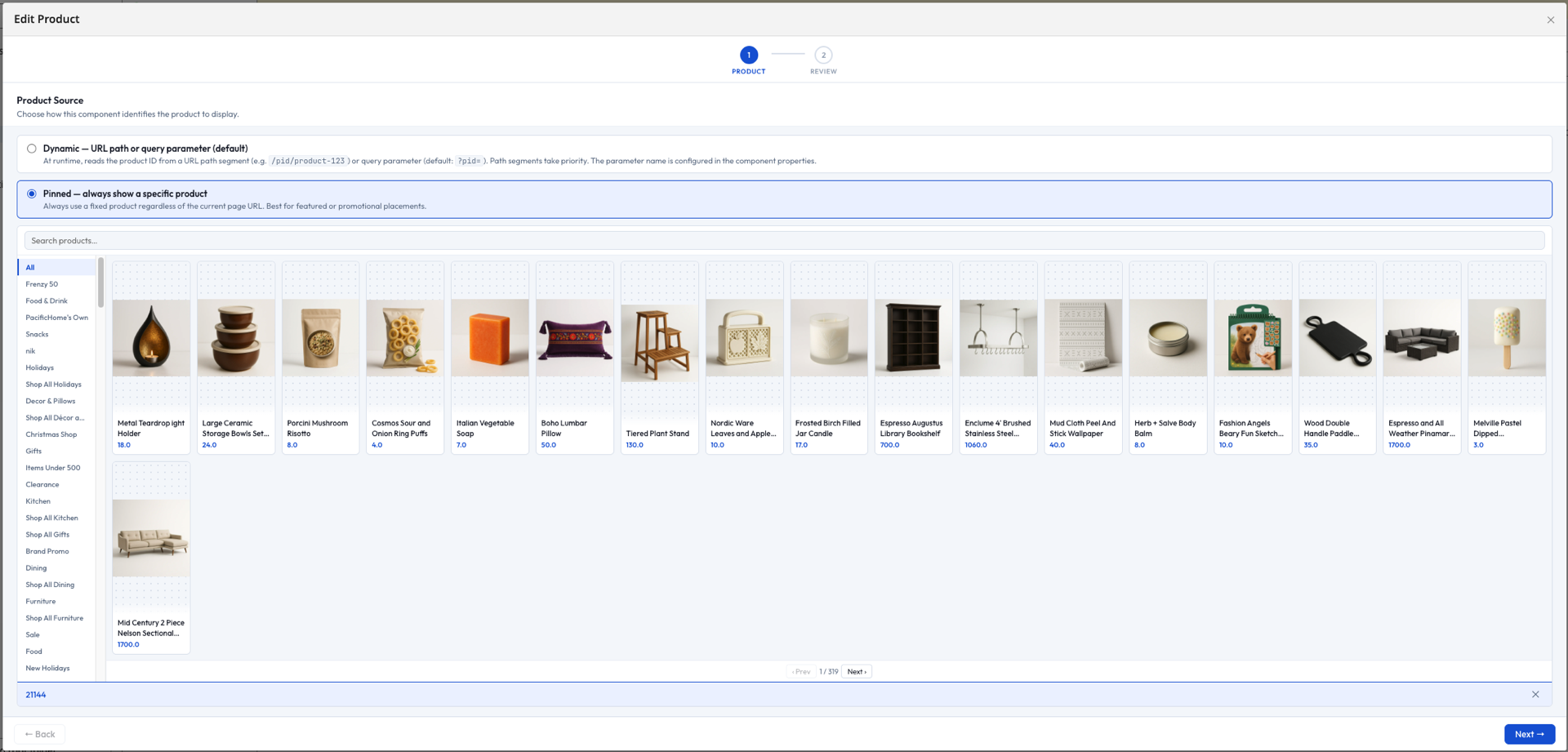
If you see Required HST service is not available: org.bloomreach.forge.discovery.site.platform.HstDiscoveryService, the site webapp is running against an older plugin build than what was installed - rebuild and redeploy the site webapp.
See Troubleshooting for more installation issues.