

Configuring Discovery Plugin
The plugin resolves its configuration from three layers that combine at request time: a global JCR node shared by every channel, optional per-channel overrides, and coded defaults for anything left unset. Nothing needs to be configured to get a working installation beyond three required credential values.
ON THIS PAGE
- How resolution works
- The global configuration node
- Injecting credentials
- Environments and staging
- Per-channel overrides
- The product field list (fl)
- Sort options
- Picker field mapping
- Circuit breaker tuning
- Verifying configuration
How resolution works
Global JCR node            Per-channel hst:channelinfo
─────────────────────      ───────────────────────────
accountId                  discoveryAccountId (override)
domainKey                  discoveryDomainKey (override)
apiKey                     discoveryApiKeyEnvVar (override)
authKey                    discoveryAuthKeyEnvVar (override)
defaultFieldList     ←     discoveryDefaultFieldList (override)
defaultPageSize
defaultSort
sortOptions
environment
- Global node - one node shared by all channels. Set here what applies deployment-wide (credentials, default field list, page size, sort).
- Per-channel overrides - optional, set on hst:channelinfo. Use when different channels connect to different Discovery accounts or catalog schemas.
- At request time: a channel override wins when set; otherwise the global node value applies; otherwise the coded default applies.
Credentials (accountId, domainKey, apiKey, authKey, environment) additionally resolve environment variable → system property → JCR, so secrets never have to live in JCR in production.
The global configuration node
The plugin reads a single, fixed JCR node:
/hippo:configuration/hippo:modules/brxm-discovery/hippo:moduleconfig/discoveryConfig
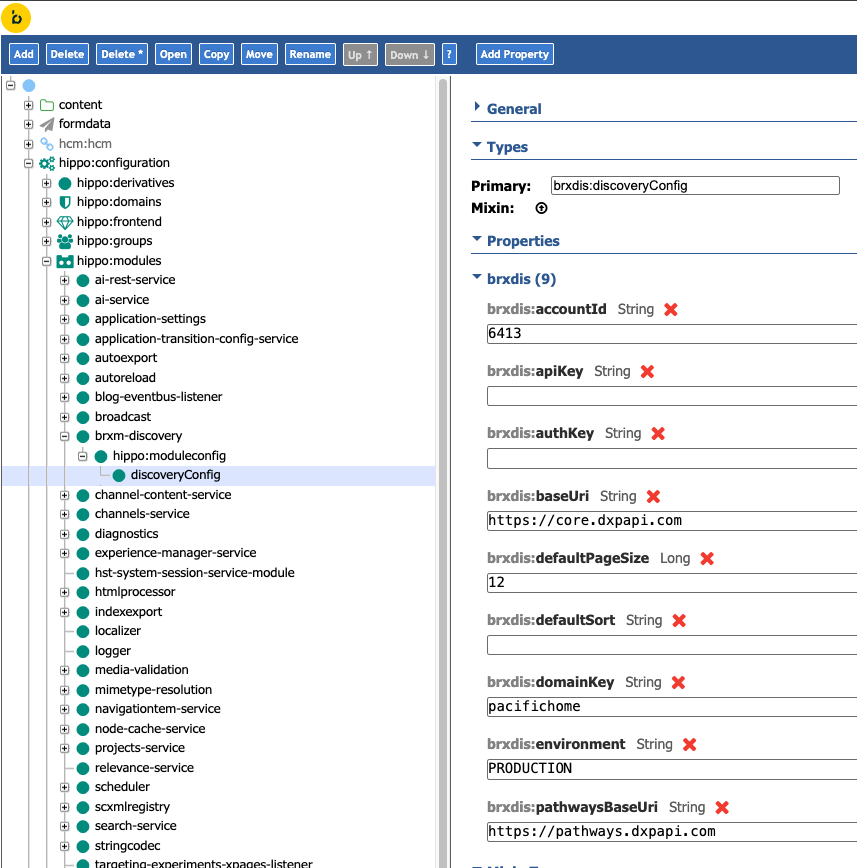
Create it via your project's bootstrap configuration:
definitions:
  config:
    /hippo:configuration/hippo:modules/brxm-discovery/hippo:moduleconfig/discoveryConfig:
      jcr:primaryType: brxdis:discoveryConfig
      brxdis:accountId: 'your-account-id'
      brxdis:domainKey: 'your-domain-key'
      brxdis:apiKey: ''
      brxdis:authKey: ''
      brxdis:environment: 'PRODUCTION'
      brxdis:defaultPageSize: 12
      brxdis:defaultSort: ''
Only accountId, domainKey, and apiKey are required. Leave apiKey (and authKey, if used) blank here and inject them via environment variables instead - see Injecting credentials below. The node itself is optional: if it doesn't exist, the plugin builds its configuration entirely from environment variables, system properties, and coded defaults.
Injecting credentials
To generate or rotate your API key and auth key, see the Discovery API Key Management documentation.
| Setting | Environment variable | System property | JCR property | Required |
|---|---|---|---|---|
| Account ID | BRXDIS_ACCOUNT_ID | brxdis.accountId | brxdis:accountId | Yes |
| Domain Key | BRXDIS_DOMAIN_KEY | brxdis.domainKey | brxdis:domainKey | Yes |
| API Key | BRXDIS_API_KEY | brxdis.apiKey | brxdis:apiKey | Yes |
| Auth Key | BRXDIS_AUTH_KEY | brxdis.authKey | brxdis:authKey | No — required only for recommendation/visual-search features that use the v2 Pathways API |
| Environment | BRXDIS_ENVIRONMENT | brxdis.environment | brxdis:environment | No — defaults to PRODUCTION |
Production (containers / Kubernetes):
env:
  - name: BRXDIS_ACCOUNT_ID
    valueFrom: { secretKeyRef: { name: discovery-credentials, key: accountId } }
  - name: BRXDIS_DOMAIN_KEY
    valueFrom: { secretKeyRef: { name: discovery-credentials, key: domainKey } }
  - name: BRXDIS_API_KEY
    valueFrom: { secretKeyRef: { name: discovery-credentials, key: apiKey } }
Local development:
mvn -P cargo.run cargo:run \
  -Dbrxdis.accountId=YOUR_ACCOUNT_ID \
  -Dbrxdis.domainKey=YOUR_DOMAIN_KEY \
  -Dbrxdis.apiKey=YOUR_API_KEY
accountId and domainKey are identifiers, not secrets — they're safe to store in JCR if convenient. apiKey and authKey should always come from environment variables or system properties in production.
Environments and staging
Set environment to STAGING to route every Discovery API call to Bloomreach's staging tier instead of production:
| API | Production | Staging |
|---|---|---|
| Search / category | core.dxpapi.com | staging-core.dxpapi.com |
| Recommendations (Pathways) | pathways.dxpapi.com | pathways-staging.dxpapi.com |
| Autosuggest | suggest.dxpapi.com | staging-suggest.dxpapi.com |
If you set a base URI explicitly (brxdis:baseUri, brxdis:pathwaysBaseUri, brxdis:autosuggestBaseUri), that value always wins over the environment-derived default. A JCR change to environment is picked up on the next request - no restart required.
Per-channel overrides
Use per-channel configuration when a deployment has multiple channels pointing at different Discovery accounts or catalog schemas. This is exposed through the plugin's DiscoveryChannelInfo interface, editable in Channel Manager under Channel Settings.
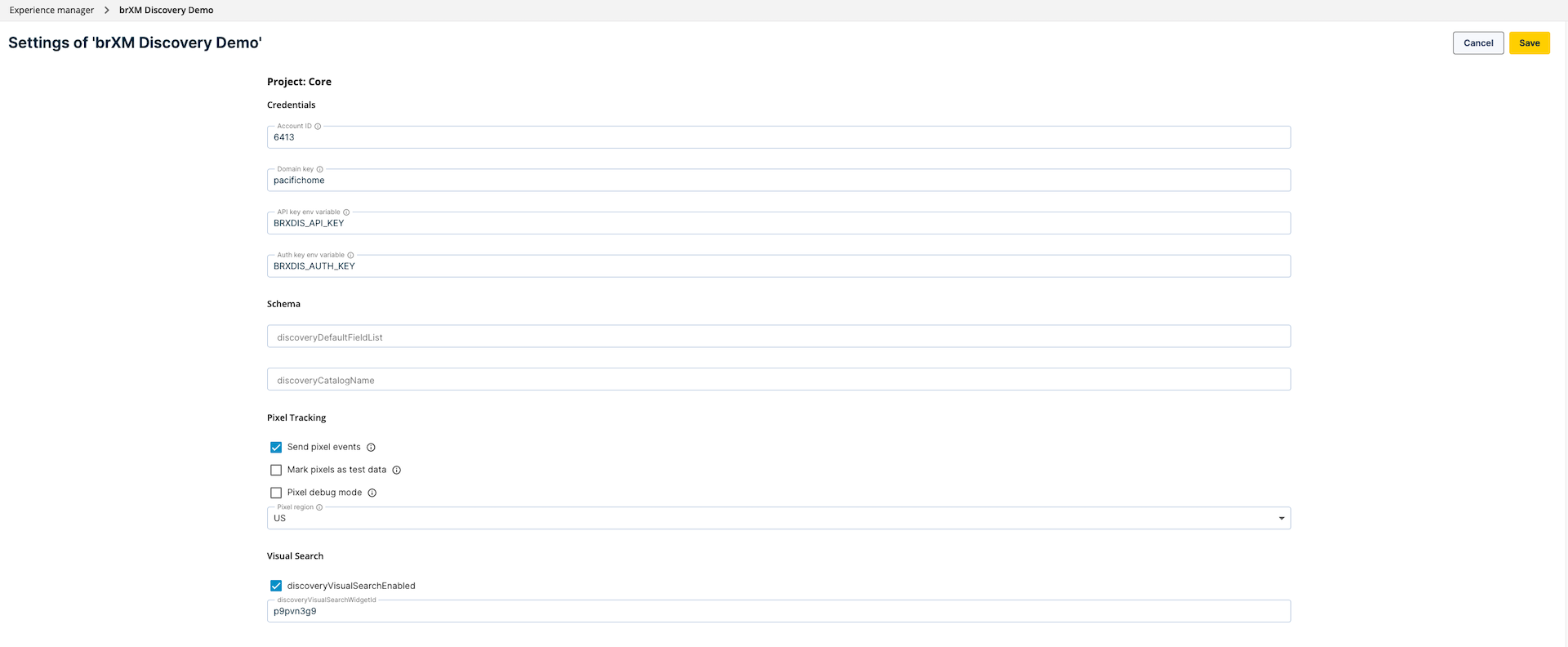
| Group | Properties |
|---|---|
| Credentials | discoveryAccountId, discoveryDomainKey, discoveryApiKeyEnvVar, discoveryAuthKeyEnvVar |
| Schema | discoveryDefaultFieldList, discoveryCatalogName |
| Pixel tracking | discoveryPixelsEnabled, discoveryPixelConsentCookie, discoveryPixelTestData, discoveryPixelDebug, discoveryPixelRegion |
| Visual search | discoveryVisualSearchEnabled, discoveryVisualSearchWidgetId |
discoveryApiKeyEnvVar and discoveryAuthKeyEnvVar are indirection pointers - they name an environment variable rather than holding a secret directly, so secrets never enter JCR even at the channel level.
/hst:hst/hst:configurations/<your-site>/hst:workspace/hst:channel/hst:channelinfo:
  jcr:primaryType: hst:channelinfo
  discoveryAccountId: '7291'
  discoveryDomainKey: 'petstore-uk'
  discoveryApiKeyEnvVar: BRXDIS_API_KEY_PETSTORE_UK
  discoveryDefaultFieldList: 'pid,title,thumb_image,url,price,brand,sale_price,description'
Enabling channel-level overrides requires wiring hst:channelinfoclass on the channel node to DiscoveryChannelInfo (or a composite interface that also extends your project's existing channel-info type, if you have one):
/hst:hst/hst:configurations/<your-site>/hst:workspace/hst:channel:
  jcr:primaryType: hst:channel
  hst:channelinfoclass: org.bloomreach.forge.discovery.site.component.info.DiscoveryChannelInfo
Pixel tracking fields are covered in full on Pixel Tracking & Consent; visual search fields are covered on Recommendations & Visual Search.
The product field list (fl)
The field list controls which product attributes Discovery returns, and therefore which fields appear in ProductSummary.attributes for your templates and the Page Model API.
The coded default covers every attribute the bundled templates use:
pid,title,thumb_image,url,price,brand,sale_price,description
If your catalog has custom attributes (e.g. pet_type, tags), set brxdis:defaultFieldList on the global node - or discoveryDefaultFieldList per channel - to the full list you need. The value replaces the default; it does not append to it.
Sort options
The sort dropdown shown in the component editor and the sortOptions Page Model API key both read from the same source, brxdis:sortOptions:
brxdis:sortOptions:
  - 'price asc=Price: Low to High'
  - 'price desc=Price: High to Low'
  - 'name asc=Name: A-Z'
  - 'name desc=Name: Z-A'
Each entry is value=Display label. When absent, the plugin falls back to the four options shown above.
Picker field mapping
The CMS picker (used by the Category and Recommendation document pickers, and the REST endpoints under ws/discovery/picker/) needs to know which fields in your Discovery feed hold a product's ID, title, image, and price so it can render result rows. These are structural settings on the global JCR node only — there is no environment variable, system property, or per-channel override for them, because they describe your catalog schema rather than a deployment secret.
| Property | JCR property | Default |
|---|---|---|
| ID field | brxdis:pickerIdField | pid |
| Title field | brxdis:pickerTitleField | title |
| Image field | brxdis:pickerImageField | thumb_image |
| Price field | brxdis:pickerPriceField | price |
/hippo:configuration/hippo:modules/brxm-discovery/hippo:moduleconfig/discoveryConfig:
  brxdis:pickerIdField: 'pid'
  brxdis:pickerTitleField: 'title'
  brxdis:pickerImageField: 'thumb_image'
  brxdis:pickerPriceField: 'price'
Change these only if your feed uses different field names than the four defaults above - for example, if productName is your feed's title attribute, set brxdis:pickerTitleField: 'productName', otherwise picker rows render with a blank title. Whatever field list you set here should also be present in fl, or the picker request won't retrieve it at all.
Circuit breaker tuning
Every outbound Discovery call goes through a per-host Resilience4j circuit breaker (CircuitBreakerDiscoveryTransport), so a slow or failing Discovery endpoint degrades one API (e.g. recommendations) without also stalling requests to the others (e.g. search). The breaker opens once it sees enough failures within its sliding window, and short-circuits new calls for a cooldown period before probing again.
These are ops-level tuning knobs, not catalog config, so they resolve environment variable → system property → coded default - the same precedence as credentials, and deliberately not available in JCR, since they're meant to be tuned per-deployment (e.g. differently in a load-test environment vs. production) without a content release.
| Setting | Environment variable | System property | Default |
|---|---|---|---|
| Failure rate threshold (%) | BRXDIS_CB_FAILURE_RATE_THRESHOLD | brxdis.cb.failureRateThreshold | 50 |
| Sliding window size (calls) | BRXDIS_CB_SLIDING_WINDOW_SIZE | brxdis.cb.slidingWindowSize | 20 |
| Minimum number of calls | BRXDIS_CB_MINIMUM_NUMBER_OF_CALLS | brxdis.cb.minimumNumberOfCalls | 10 |
| Wait duration in open state (seconds) | BRXDIS_CB_WAIT_DURATION_IN_OPEN_STATE_SECONDS | brxdis.cb.waitDurationInOpenStateSeconds | 30 |
With the defaults: once at least 10 calls have been made in a rolling window of 20, if 50% or more failed, the breaker opens and fails fast (without calling Discovery) for 30 seconds before allowing a trial call through.
mvn -P cargo.run cargo:run \
  -Dbrxdis.cb.failureRateThreshold=40 \
  -Dbrxdis.cb.waitDurationInOpenStateSeconds=60
Verifying configuration
GET http://localhost:8080/cms/ws/discovery/picker/search?q=shirt
Expected: a JSON array of products, not a 404 or empty error response.
| Symptom | Likely cause |
|---|---|
| ConfigurationException: Discovery accountId is required | Credentials not set — check environment variables |
| Product grid empty, no error shown | accountId / domainKey don't match your Discovery account |
| Custom attribute missing from attributes | Not included in defaultFieldList |
More symptoms and fixes are cataloged on Troubleshooting.