

Bloomreach Experience Manager V16.4 Release Notes
Highlights for v16.4
We are pleased to announce a new version of Bloomreach Experience Manager (brXM). This minor release introduces a number of new features, useful technical stack upgrades and improvements to the product. In this document we will give a brief overview of the highlights in this release. You can also find these release notes at: https://xmdocumentation.bloomreach.com/about/release-notes/release-notes-overview.html
Everything mentioned in this document is an integral part of Bloomreach Experience Manager (brXM), unless mentioned otherwise.
Significant Updates
Introducing Your Content Co-Pilot: BrXM AI Content Assistant (BETA), Powered by Loomi
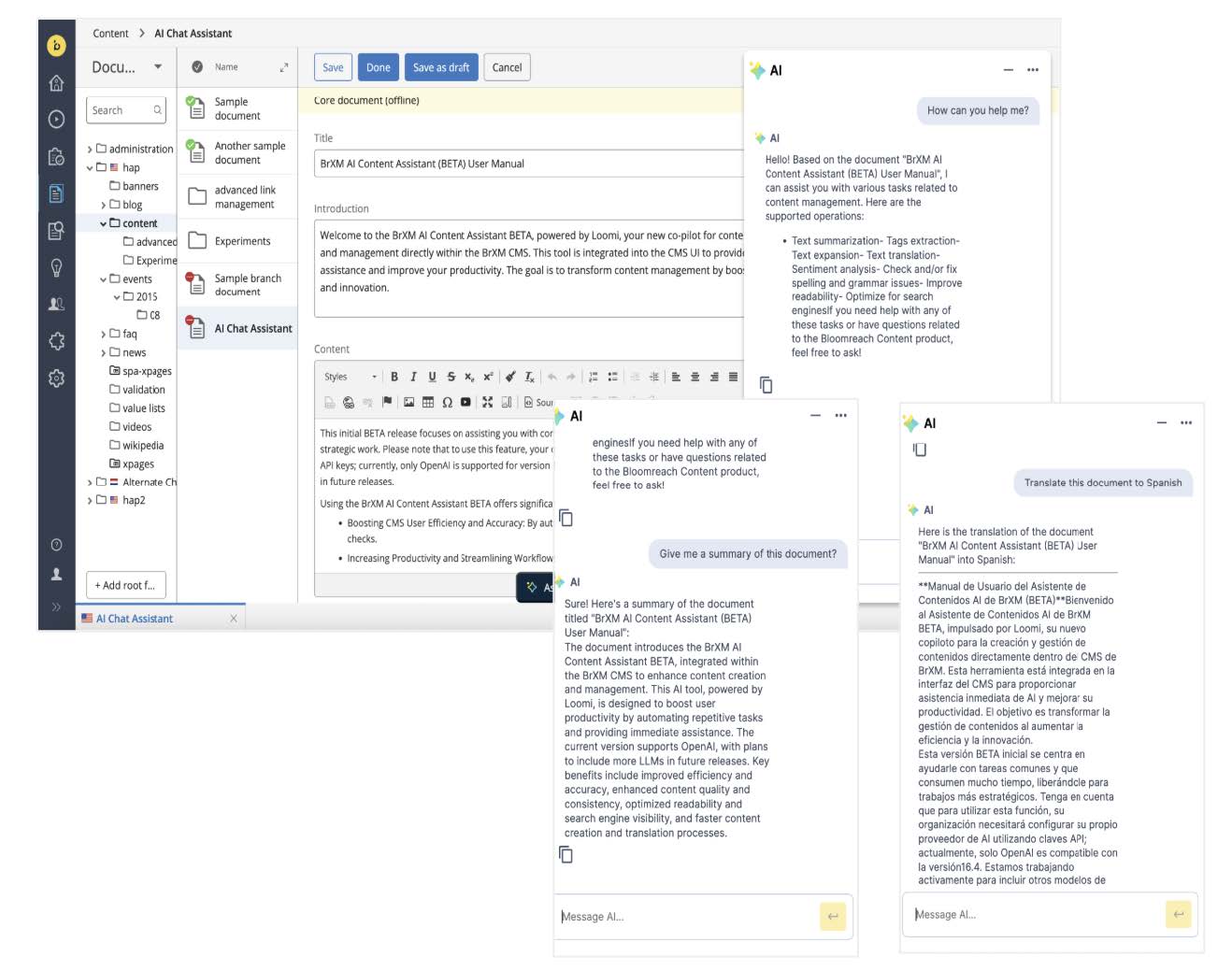
Today's content creation and management often involves time-consuming manual tasks. This new feature AI Content Assistant is designed to act as your co-pilot, helping with repetitive work and boosting your efficiency, quality, and productivity. Powered by Loomi, this assistant seamlessly integrates into the BrXM CMS to bring AI capabilities directly to your content creation workflows
With the BrXM AI Content Assistant BETA, you can now easily:
-
Generate Metadata Tags automatically.
-
Receive smart SEO Optimization Suggestions.
-
Quickly Check and Fix Spelling and Grammar Issues.
-
Generate concise Content Summaries or expand on your ideas.
-
Efficiently handle Multilingual Content Creation and Translation.
-
Get immediate assistance for BrXM through the AI Chat Assistant.
These capabilities are the first phase of our commitment to AI-first content management. This BETA release lays the foundation for more advanced "Agentic AI" features to come, where AI will play an even larger role in streamlining workflows and enhancing your experience. Future releases will expand on these capabilities with features like broader contextual awareness and automated actions.
Important Note: To use this feature, your organization will need to configure its own AI provider using API keys; currently, only OpenAI is supported for version 16.4. We are actively working to include other common LLMs in future releases.
For detailed instructions on how to use the BrXM AI Content Assistant, please refer to the User Manual [1] and Developer Guide [2].
Ongoing Enhancements and Fixes
For end users
-
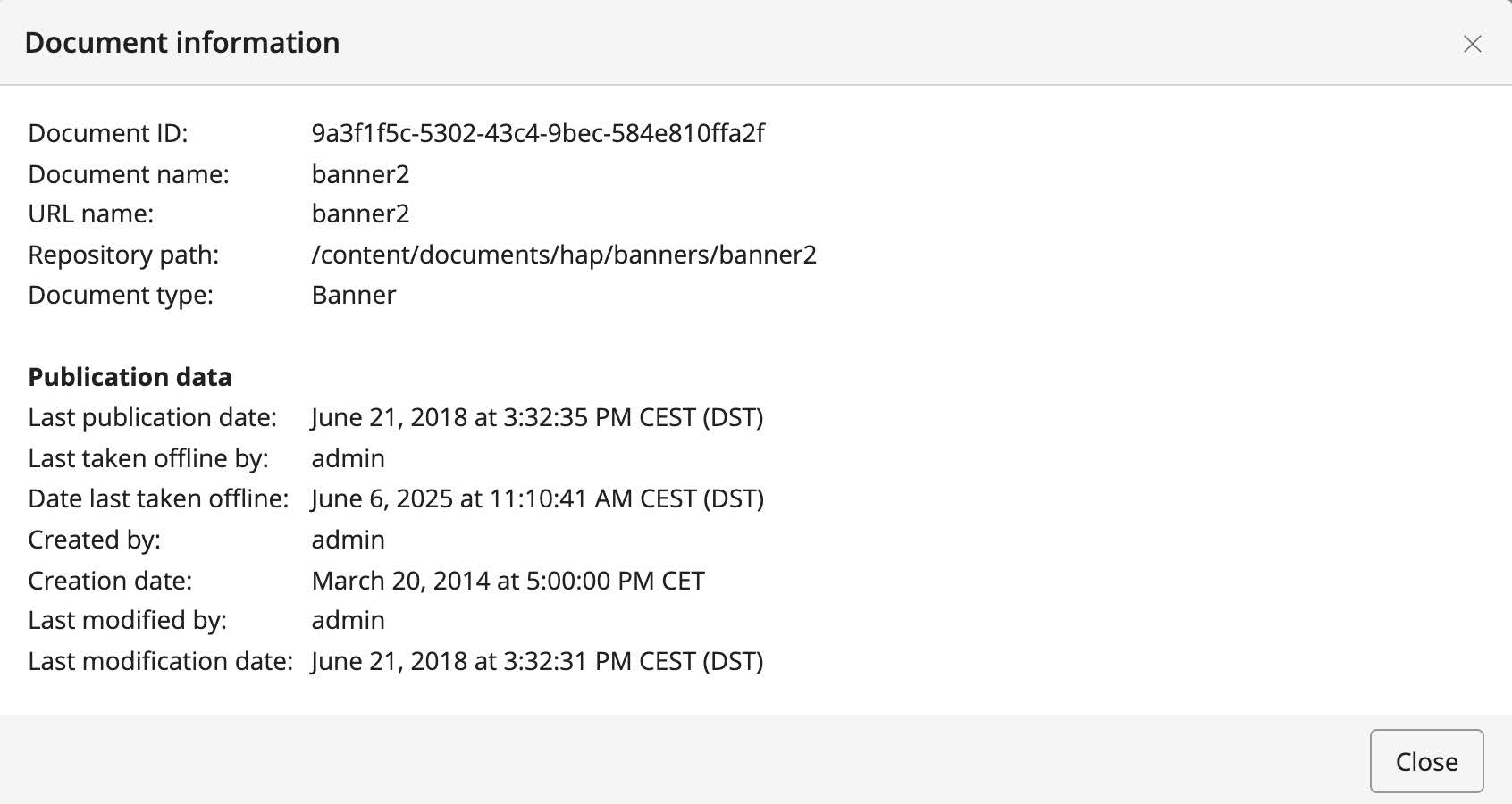
We introduced the `depublicationDate` and `depublishedBy` properties to the published document variant. These properties are now shown in the document information dialog.
-
We fixed the issue where the max items text was incorrectly displayed inside the text field in the Experience Manager.
-
We fixed a bug that caused creating Experience pages via the Experience Manager to result in a "normal" document instead, specifically when multiple experience page layouts were configured.
-
We addressed the issue where documents were not selectable for custom workflows in the Advanced Search panel for users who did not have `hippo:editor` privileges. A configuration option was added to the `SearchViewPlugin` to align the permission check with any custom workflow.
-
We fixed the issue where the Experience Manager Content was not loading when a page was locked by another user. This resulted in the second user receiving a 403 error, the content tab not filling, loading not stopping, and inability to cancel.
-
We resolved the issue where Experience manager content did not load on pages despite not being locked.
-
We fixed the issue where the "switch to the content editor" link in Experience Manager was not working when German was set as the UI language.
-
We resolved the issue where the delete document dialog could not be dismissed by non-admin users, requiring a page refresh even after a successful delete message.
-
We fixed the issue where the Site References tab did not display the linked menu item for components.
-
We resolved an issue where the location was empty in Site references, specifically when the menu item referred to a sitemap item by refId. The system now correctly identifies and displays the sitemap item location
-
We fixed an issue where the application would become unresponsive when switching views from the Experience Manager after making component changes, specifically when clicking 'Cancel' on the "Discard / save / cancel" pop-up.
-
We fixed the issue where the offline status icon for linked documents was not displayed in the Experience Manager component properties.
-
We fixed an issue where the delete document dialog for non-admin users could not be dismissed after successful deletion, often seen with editor users and accompanied by a NullPointerException.
For developers
-
We addressed an issue where **`hst-core.tld` had orphaned text.
-
We fixed a regression related to a JSON library change where eForm messages were wrongly serialized. The UI now shows the correct message.
Bloomreach SPA SDK Updates
The latest Bloomreach SPA SDK release, v24.1.0[3], supports React 19.Documentation, React example, Next.js examples are updated to React 19 and Next.js 15.
Bloomreach Cloud Updates
Enhanced Observability with Sysdig Integration
We are introducing a new feature that enhances observability by exposing Bloomreach Cloud metrics to third-party monitoring tools. Specifically, we have built a Sysdig API integration that allows you to pull Sysdig metrics directly into your monitoring environment for unified monitoring and visualization. We internally use Sysdig to monitor metrics of all stacks on Bloomreach Cloud. This integration leverages the Sysdig Prometheus API, enabling you to gain deeper insights into the performance and health of your Bloomreach Cloud deployments by accessing and visualizing metrics within your preferred monitoring tools. To utilize this, you will need to configure your monitoring tool with the Sysdig API token, which the Bloomreach Cloud team will provide.
-
Benefits:
-
Unified Monitoring: Consolidate Bloomreach Cloud metrics into your existing monitoring dashboards for a holistic view of your system's health.
-
Improved Insights: Gain better visibility into performance trends, resource utilization, and potential issues through detailed metric analysis.
-
Streamlined Workflow: Simplify troubleshooting and performance optimization by having all relevant metrics in one place.
-
Prometheus Compatibility: Seamlessly integrate with any monitoring tool that supports Prometheus data sources.
-
-
How to Get Started: The solution can be used with monitoring tools that support Prometheus data sources. If you are interested in this feature, please contact the Bloomreach Support team via https://support.bloomreach.com/. The Bloomreach Cloud team will provide you with the necessary Sysdig API token and configuration instructions.
Professional Services Plugin Newsletter
Several Bloomreach Forge plugins, maintained by the Bloomreach Professional Services team, have new versions with enhancements and fixes:
-
Bloomreach Camel Event Bus Support Plugin (v5.1.0): Integrates brXM with Apache Camel for event-driven architectures. See Release Notes [4] for changes, including new features and migration details.
-
Content Export / Import Plugin (v6.1.0): Offers improved content migration and synchronization for Bloomreach environments. Details on enhancements are in the Release Notes [5].
-
JCR Pojo Bind Plugin (v3.1.0): Simplifies mapping Java POJOs to brXM's JCR content. Update specifics are in the Release Notes [6].
-
Gallery magick image processing Plugin (v4.1.0): Updates ImageMagick integration for advanced image processing in brXM. See Release Notes [7] for details on new features and compatibility.
Get help from BrXM Experts for Upgrade
The Bloomreach Professional Services team possesses extensive expertise in BrXM and has successfully executed various project implementations. Our team can facilitate a seamless upgrade of your project to the latest BrXM versions.
Additionally, we offer an Upgrade Assessment service for your projects. In just 3 days, our comprehensive evaluation will provide you with invaluable insights into your investment requirements. Our team of experts meticulously assesses your existing systems and infrastructure to determine the necessary investment for the upgrade.
The resulting detailed report encompasses the following components:
-
Executive summary
-
Overview of major changes
-
Recommended upgrade procedure
-
A comprehensive list of findings
It's important to note that the evaluation fee* is fully refundable should you decide to proceed with our Professional Services for the actual upgrade. This ensures that you not only receive top-notch guidance but also keeps your best interests in mind.
If you're interested in availing the assistance of our Professional Services team for your upgrade, please get in touch with your account manager. We're here to support your project's success every step of the way.
Notices
JVM default time zone on Bloomreach Cloud
When running brXM v16.x on Bloomreach Cloud, the JVM default time zone is UTC. Any date/time processing that relies on the JVM default time zone (instead of an explicitly configured one) will therefore use UTC.
Changing the time zone behavior
- CMS UI time zone
Configure the login page timezone dropdown. This allows users to select their timezone on login, defaulting to the browser timezone. It's also possible to configure a single timezone for all users.
See: Configure the CMS login page (time zone selection dropdown) - JVM default time zone
Alternatively, the timezone can be explicitly set as a JVM system property. Upload a properties file containing, for example, user.timezone=Europe/Amsterdam and configure it as a Java System Properties file during deployment.
Minor release
v16.4 is a minor release, so it is backward compatible with the previous minor release. Also, updating to this version from the previous minor version should be of little effort. Specific upgrade instructions for this release can be found in our documentation[8] for enterprise customers (requires a login). An overview of all upgrade instructions for minor versions in this major release can also be found in our documentation [9].
Supported Technologies
The full system requirements can be found in the online system requirements [10]. This page also includes a detailed table of maintained third-party compatibility.
End-of-life, support and maintained code
Nomenclature refresher
As the terms ‘end-of-life’, ‘supported’, ‘maintained’ are used in various ways in our industry, we clarify the nomenclature we use for this below.
Supported product version
When a product is supported, this means that the customer will receive help from the helpdesk when issues arise as described in the service level agreement (SLA) that the customer has with Bloomreach. There are several service levels available.
Please note that if a bug is acknowledged in a supported, but not-maintained version, and a fix is needed, this fix will only be applied in the maintained product versions. This means the customer will need to move to a maintained version to receive the fix.
Maintained product version
When a product is maintained, the product code is updated and security- and bug fixes are made to the code. For maintained products, the system requirements for third party libraries and components are kept updated as well. Please note that we do not provide support for system requirement providers (e.g. databases, java, etc..), but we only support the usage for mentioned certified system requirement providers.
If a product is non-maintained, this means that the code is not maintained anymore and therefore might contain bugs and/or security vulnerabilities due to newly discovered issues in our code, or the libraries used.
End-of-life product version
Products that are not maintained and not supported are end-of-life. These might be available from our archives but could be removed without notice.
What does this mean for the current release?
Please note that this release changes existing maintenance or support modes. In the table below you can find the support status of your product and when support will end; this is dependent on the version currently being used and license level. Please note that versions that are not listed are not active and not supported, and therefore end-of-life.
|
Version |
Planned end date of |
Planned end date of |
Original major version release date |
|
12.6 |
No Support |
No support |
July 2017 |
|
13.4 |
No Support |
No support |
January 2019 |
| 14.7 | December 2024 | December 2025 | December 2019 |
|
15.7 |
December 2025 |
December 2026 |
April 2022 |
| 16.4 | December 2026 | December 2027 | June 2024 |
Figure: reference table of planned end of support dates based on current SLA terms. Supported versions may differ depending on contractual agreements.
The versions highlighted in orange are actively maintained and provided with bug fixes and product improvements.
Security notes
This release includes updates for third-party dependencies that have published vulnerabilities. We recommend that customers keep their systems up to date with announced product releases.
Availability
This version of brXM is available as of January 29, 2025 onwards, the release of the open source will be made available after approximately 2 years due to our release policy.
Links
[1] https://xmdocumentation.bloomreach.com/library/end-user-manual/ai-content-assistant.html
[3] https://github.com/bloomreach/spa-sdk/releases
[4] https://github.com/bloomreach-forge/camel-events-support
[5] https://bloomreach-forge.github.io/content-export-import/release-notes.html
[6] https://bloomreach-forge.github.io/jcr-pojo-binding/release-notes.html
[7] https://bloomreach-forge.github.io/gallery-magick/release-notes.html
[8]https://xmdocumentation.bloomreach.com/library/upgrade-minor-versions/upgrade-16.3-to-16.4.html
[9] https://xmdocumentation.bloomreach.com/about/upgrade/introduction.html
[10] https://documentation.bloomreach.com/library/about/system-requirements.html