

Bloomreach Experience Manager V17.2 Release Notes
Highlights for v17.2
We are pleased to announce a new version of Bloomreach Experience Manager (brXM). This minor release introduces a number of new features, useful technical stack upgrades and improvements to the product. In this document we will give a brief overview of the highlights in this release. You can also find these release notes at: https://xmdocumentation.bloomreach.com/about/release-notes/release-notes-overview.html
Everything mentioned in this document is an integral part of Bloomreach Experience Manager (brXM), unless mentioned otherwise.
Significant Updates and New Features
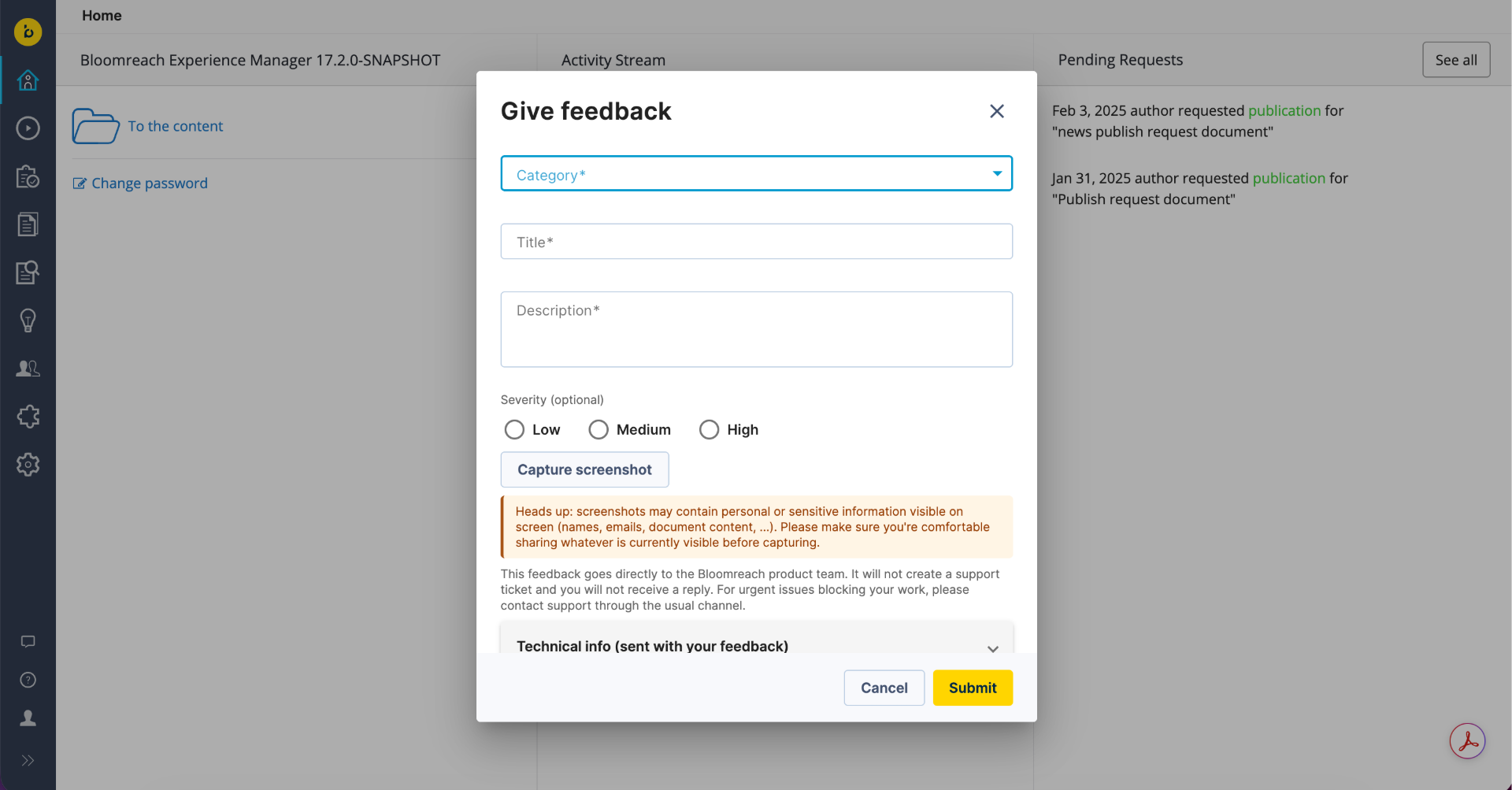
In-Product Feedback: A direct line to the product team, right from the CMS
A new "Feedback" button in the CMS navigation bar lets CMS users report issues and suggest improvements directly to the Bloomreach Content product team, without leaving the CMS or opening a support ticket. It's a faster, more direct way to get feedback in front of the people building the product, and helps us prioritize what to fix and improve next based on what you're actually running into day to day. You stay in control throughout: nothing is sent until you click Submit, and you can see exactly what's included beforehand.
It's enabled by default and sends feedback to a Bloomreach-managed endpoint out of the box; you can turn it off from the CMS console or you can point the widget at a custom endpoint, if your organisation wants to receive feedback in its own system.
Note: Feedback submitted through this widget does not create a support ticket and you won't receive a direct reply. If you need a response or are blocked on an issue, please contact Bloomreach Support through your usual channel.
See In product Feedback documentation for more details.
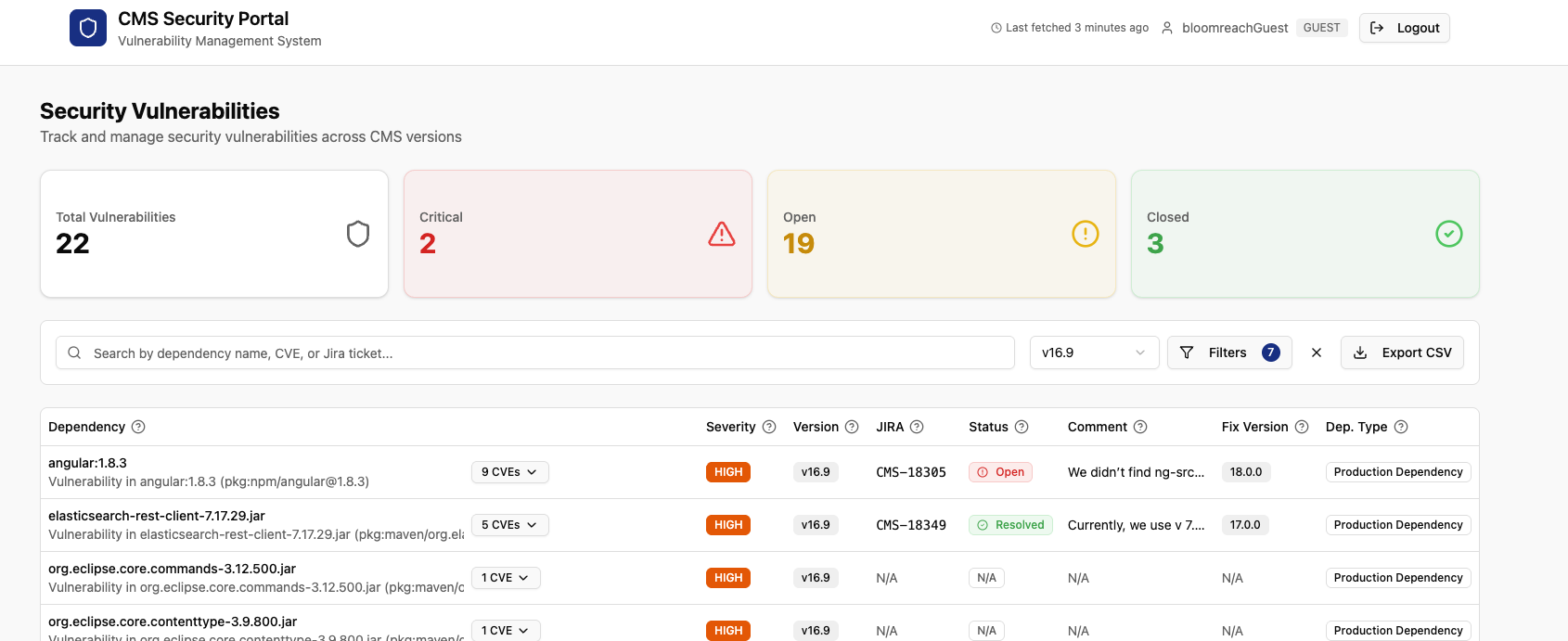
Content Vulnerability Dashboard: See your security posture at a glance
The CMS Vulnerability Dashboard gives administrators a live, self-service view of which known vulnerabilities apply to their specific brXM version and configuration, instead of waiting on a support ticket or a scheduled report.
This is a stand-alone dashboard, available independent of which CMS version you're running.
Access: Available to Premium Support customers. If you're already on Premium Support, contact the Bloomreach Support team to get set up with your dashboard access. If you're interested in moving to Premium Support, reach out to your account manager.
See Content Vulnerability Dashboard documentation for more details.
Ongoing Enhancements and Fixes
For end users
Experience Manager
-
The authoring environment is now more resilient: if a single plugin runs into trouble, the rest of the page keeps working normally so you can carry on with your other work.
-
Drag and drop now works correctly when reordering items in ordered lists in the channel editor.
-
Entering a channel from the Projects perspective now switches to the correct branch, instead of staying on the previously selected one.
-
Locks, edits, and other activity across the document list, revision history, Experience Manager, and Projects now show the actual person's name instead of a raw username.
-
Opening a channel now correctly reflects the current project state instead of showing stale information.
-
Locked channels now correctly prevent moving items in the navigation menu, matching the lock's other restrictions.
-
The component property editor now opens automatically after you drop a component into an SPA channel, as expected.
-
Fixed the placement of the focus outline on certain fields.
-
External links no longer open in a disruptive new browser tab — they now navigate in the same tab.
-
Fixed a label display issue on multiple/optional fields.
-
When overriding a menu item's name in Advanced settings, the toggle now correctly stays on after saving, so it's clear at a glance that a custom name is in use.
Content Editor
-
Files with less common extensions (such as .kml or .log) that your project allows now upload consistently — the upload dialog and the server agree on what's allowed, so an enabled type always works.
-
Take offline date now shows up in a document's revision history, so you have a complete picture of what happened and when.
-
When you take a document offline from the Version History dialog, you can now record why — useful context for anyone reviewing that history later.
-
Asset and image listings and the pickers now also show the time a file was last modified, not just the date — useful for telling apart files modified on the same day.
-
Document types are now sorted by their translated label instead of their internal name.
For developers
AI Content Assistant
-
Spring AI has been upgraded to 2.0.0. As part of this upstream change, the Vertex AI Gemini integration now uses Google's newer Spring AI module, and several configuration properties have been renamed or removed. See the AI Module Upgrade Guide for the full list before upgrading.
Platform & stability
-
A rendering exception in a single plugin previously could take down the whole authoring page, because Wicket's PanelMarkupSourcingStrategy never invoked the intended fallback catch block. A new ResilientMarkupSourcingStrategy now contains the failure to that plugin's own panel.
-
Spring Boot has been upgraded to 4.1.0.
-
Fixed a regression that prevented custom plugin-based value list providers from resolving correctly.
-
The deprecated OpenTelemetry deployment.environment attribute has been replaced with its supported successor.
-
Fixed URL encoding validation when creating HST pages.
-
hst:authenticated can now be overridden at the sitemap item level.
-
Added error catching to prevent unrelated SEVERE-level log noise.
Targeting & Content Audiences
-
The Targeting and Content Audiences front end has been migrated from AngularJS 1.8.3/ExtJS to Angular, completing the migration program.
Security Fixes
-
This release includes fixes for known vulnerabilities. We recommend upgrading to the latest patch version. Premium Support customers can check applicability to their specific environment via the Vulnerability Dashboard (see above).
Bloomreach SPA SDK Updates
Bloomreach SPA SDK 28.1.0 is available
-
Pulling in an image or a referenced document now takes one step instead of two: new getImage() and getDocuments() helpers get you straight to the content.
-
Fixed a bug where entering a default port explicitly in your endpoint URL could break the connection.
-
Channel Manager previews for content-heavy pages no longer jump around while loading, for a steadier editing experience. Requires brXM 17.2.0 or later.
See the SPA SDK v28.1.0 release notes for details.
Bloomreach Cloud Updates
Native OpenTelemetry tracing for Bloomreach Cloud customers
Bloomreach Cloud customers can now export distributed traces from their CMS environment to their own OTLP-compatible observability backend (Dynatrace, Grafana Cloud, Honeycomb, and similar), extending the existing OpenTelemetry pipeline that already carries log data.
This is a platform-level rollout, available now for customers on brXM 16.0 and later.
Setup: As with log forwarding today, the Bloomreach Cloud team needs to enable trace export for your environment. Open a support ticket to get set up.
See OpenTelemetry Tracing on Bloomreach Cloud for how to configure your observability backend to receive the traces.
Ecosystem & Add-on Updates from Professional Services Team
Bloomreach Forge Plugins Upgraded for brXM 17
Several Bloomreach Forge community plugins, such as IP Filter Plugin and Servlet Filter Decorators, have been upgraded for brXM 17 (Java 21 and Spring Boot 4).
For the current status and released version of each plugin, see the Forge project list. Additional plugins are being upgraded progressively.
Get help from Bloomreach Content Experts for Upgrade
The Bloomreach Professional Services team possesses extensive expertise in Bloomreach Content and has successfully executed various project implementations. Our team can facilitate a seamless upgrade of your project to the latest BrXM versions.
Additionally, we offer an Upgrade Assessment service for your projects. In just 3 days, our comprehensive evaluation will provide you with invaluable insights into your investment requirements. Our team of experts meticulously assesses your existing systems and infrastructure to determine the necessary investment for the upgrade.
The resulting detailed report encompasses the following components:
-
Executive summary
-
Overview of major changes
-
Recommended upgrade procedure
-
A comprehensive list of findings
It's important to note that the evaluation fee* is fully refundable should you decide to proceed with our Professional Services for the actual upgrade. This ensures that you not only receive top-notch guidance but also keeps your best interests in mind.
If you're interested in availing the assistance of our Professional Services team for your upgrade, please get in touch with your account manager. We're here to support your project's success every step of the way.
Notices
AI Content Assistant Module Spring 2.0 Upgrade
These configuration changes stem from an upstream upgrade to Spring AI 2.0.0 and affect projects that use the AI Content Assistant. Review each item before upgrading.
PromptLoggerAdvisor log level
The log level for PromptLoggerAdvisor has changed from INFO to DEBUG. If your logging configuration only captures INFO and above, update it so these logs remain visible after upgrading.
Usage Audit Logging
The log level for the UsageLoggingStore logger has been changed from INFO to DEBUG. Make sure you update your logging configurations if needed.
Vertex provider renamed
The Vertex AI provider has been renamed from VertexAIGemini to GoogleGenAiVertex, matching the same rename made upstream by Google and Spring AI. If your project configures the Google provider, update any configuration that still references the old name.
Removal of completions-path and embeddings-path
The OpenAI provider no longer supports the completions-path and embeddings-path configuration properties. If your project sets either of these, remove them, as they no longer have any effect.
OpenAI API URL default changed
The default OpenAI API endpoint (spring.ai.openai.api.url) has changed from https://api.openai.com/v1 to https://api.openai.com. If you rely on the default, no action is needed. If you've set this property explicitly, confirm it still points to the endpoint you intend.
Minor release
v17.2 is a minor release, so it is backward compatible with the previous minor release. Also, updating to this version from the previous minor version should be of little effort. Specific instructions for upgrading from v17.1 to v17.2 are available for enterprise customers (login required). Please also find the overview of minor version upgrade instructions in this major release in our documentation.
Supported Technologies
Full system requirements, including a comprehensive table of maintained third-party compatibility, are available in the system requirements documentation.
End-of-life, support and maintained code
Nomenclature refresher
As the terms ‘end-of-life’, ‘supported’, ‘maintained’ are used in various ways in our industry, we clarify the nomenclature we use for this below.
Supported product version
When a product is supported, this means that the customer will receive help from the helpdesk when issues arise as described in the service level agreement (SLA) that the customer has with Bloomreach. There are several service levels available.
Please note that if a bug is acknowledged in a supported, but not-maintained version, and a fix is needed, this fix will only be applied in the maintained product versions. This means the customer will need to move to a maintained version to receive the fix.
Maintained product version
When a product is maintained, the product code is updated and security- and bug fixes are made to the code. For maintained products, the system requirements for third party libraries and components are kept updated as well. Please note that we do not provide support for system requirement providers (e.g. databases, java, etc..), but we only support the usage for mentioned certified system requirement providers.
If a product is non-maintained, this means that the code is not maintained anymore and therefore might contain bugs and/or security vulnerabilities due to newly discovered issues in our code, or the libraries used.
End-of-life product version
Products that are not maintained and not supported are end-of-life. These might be available from our archives but could be removed without notice.
What does this mean for the current release?
Please note that this release changes existing maintenance or support modes. In the table below you can find the support status of your product and when support will end; this is dependent on the version currently being used and license level. Please note that versions that are not listed are not active and not supported, and therefore end-of-life.
|
Version |
Planned end date of |
Planned end date of |
Original major version release date |
| Latest 14.x | December 2024 | December 2025 | December 2019 |
| Latest 15.x |
December 2025 |
December 2026 |
April 2022 |
| Latest 16.x | December 2026 | December 2027 | June 2024 |
| Latest 17.x | December 2027 | December 2028 | May 2026 |
Figure: reference table of planned end of support dates based on current SLA terms. Supported versions may differ depending on contractual agreements.
The versions highlighted in orange are actively maintained and provided with bug fixes and product improvements.
Security notes
This release includes updates for third-party dependencies that have published vulnerabilities. We recommend that customers keep their systems up to date with announced product releases.
Availability
This version of brXM is available as of August 13, 2026 onwards, the release of the open source will be made available after approximately 2 years due to our release policy.